Most construction teams do not fail at building; they fail at planning and interpreting project data quickly enough. A poor scheduling decision made before a project breaks ground can cascade into missed milestones, budget overruns, and strained subcontractor relationships that take months to repair. KPMG’s 2023 Global Construction Survey found that only half of project owners’ projects were meeting completion deadlines, while 37% of respondents had missed budget or schedule targets because of ineffective risk management. Knowing what to look for in construction scheduling software before investing is therefore about more than comparing features. You need to evaluate how clearly the platform turns schedule, resource, and cost data into decisions.
- How Construction Scheduling Software Visualizes CPM Logic
- Real-Time Data Supports Better Field and Office Decisions
- Construction Project Software Must Connect Existing Data
- Pricing Should Match Decision-Maker Access
- Frequently Asked Questions
- Which schedule visualizations are most useful for construction decisions?
- What is the difference between CPM scheduling software and a basic Gantt chart tool?
- Should field teams have access to the full project schedule?
- How should a contractor test scheduling dashboards before buying?
- Conclusion
There are four areas every project manager and contractor should stress-test before signing a software contract. Each one directly affects whether your team can use the tool to spot risk, test options, and act on reliable project information rather than abandoning it after the first billing cycle.
How Construction Scheduling Software Visualizes CPM Logic
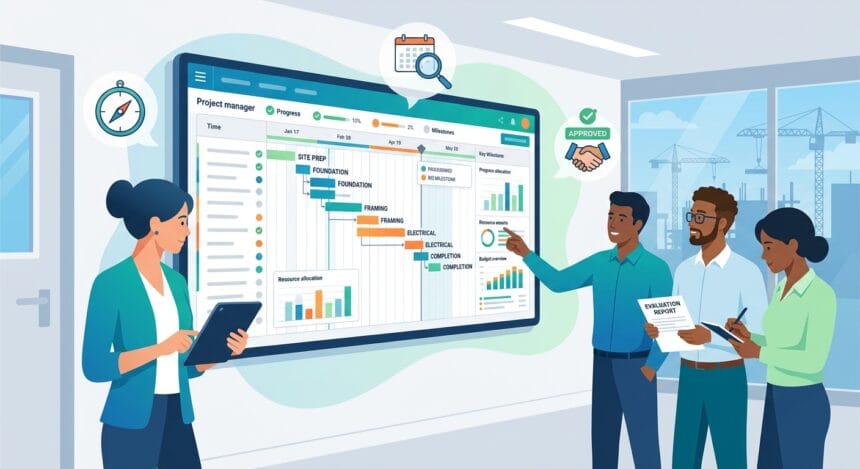
Clear visual output separates a genuinely useful tool from one that simply looks impressive in a sales demo. The best project scheduling software for construction represents your full CPM network on a digital canvas that both field teams and office staff can read at a glance, without needing a full-time scheduler to translate the data. Look for software that lets you build activities, assign logic ties, and identify the critical path without manual workarounds or formula hacks. A clean visual layer does not just make presentations easier; it shortens the feedback loop between planners and foremen, which is where schedule drift often starts.
Pay attention to how the CPM scheduling software displays total float, free float, lag, constraints, and baseline variance. If those elements are buried in a spreadsheet view that nobody checks, the scheduling logic loses much of its decision-making value when a change order lands. Strong visual CPM support means your team can see how a change affects critical and near-critical activities before a small slip becomes a two-week delay. Test this during any free trial by building a 50-to-100-activity schedule and checking how the critical path and available float update as you adjust predecessor relationships. If the tool cannot surface that clearly, it will struggle on a real job.

Resource and cost loading are the next layer of visualization that separates simple construction scheduling tools from purpose-built platforms. Many general-purpose project management apps let you assign people to tasks, but they do not show resource histograms, budget burn against planned value, or the relationship between crew availability and float on a critical activity. Before you invest, ask the vendor to show you a resource-loaded schedule with at least three resource types and a cost baseline. Watch how the tool handles over-allocation. Does it flag conflicts automatically, or do you have to find them manually?
The ability to see resource peaks and valleys alongside CPM activities gives decision-makers the context to shift crews, resequence work, or protect a milestone. The same applies to financial views. Planned value, actual cost, earned progress, and forecast-at-completion data should be easy to compare without exporting everything into a separate reporting system. Teams that skip this step during evaluation can discover mid-project that their software cannot answer the questions owners and sureties are asking.
Real-Time Data Supports Better Field and Office Decisions
Construction schedules fail when the person building the plan works in a different system from the person executing it. A disconnect between office and field is one of the most predictable causes of look-ahead schedule errors, and it often traces back to a software choice made without field input. The right tool gives superintendents and project engineers access to the same schedule, with changes reflected immediately for everyone rather than pushed out in weekly exported PDFs.
Before you invest, ask your field team to sit in on the demo. Watch their reaction. If they cannot find activities, enter progress, and understand visual status indicators within a few minutes, adoption will struggle no matter how capable the backend is. Real-time collaboration also means your morning huddle can pull from live data instead of a snapshot taken 48 hours earlier. That gap between snapshot and reality is where schedule risk grows, and the right software closes it without requiring anyone to sync files or re-enter updates manually.
Look also at how the software handles short-interval planning, such as three-week or six-week look-ahead schedules that field teams rely on daily. Many platforms support long-range CPM scheduling reasonably well but fall apart at the look-ahead level, forcing superintendents to build separate spreadsheet plans that never connect back to the master schedule. That disconnect breaks accountability and fragments the data used for decisions.
Ideally, the look-ahead should pull directly from the master CPM schedule. When a field activity slips, the effect on downstream milestones should be immediately visible to the project manager, superintendent, and subcontractor whose crew is next in line. Test this workflow thoroughly. Build a simple look-ahead inside the platform and delay one activity by two days. Then check how quickly the master schedule reflects that change, whether float and milestone forecasts update, and whether the system notifies the right people. Software that cannot pass that test will not improve schedule management; it will add another layer of administrative work.
Construction Project Software Must Connect Existing Data
No scheduling software exists in isolation on a real construction project. Your team already works inside platforms for document management, BIM coordination, field reporting, and financial tracking. The scheduling tool needs to exchange data with those systems without manual re-entry. Before you commit to any platform, get a clear answer on which connections are native, which rely on third-party connectors, and which require custom API work that your IT team must maintain.
Native connections with platforms your office already uses, especially for document control and field reporting, are worth more than a long list of theoretically available integrations. Also ask about import and export compatibility with industry-standard scheduling formats. Many owners, general contractors, and sureties require schedule submissions in Primavera P6 or Microsoft Project formats. If your chosen construction management software cannot import or export those file types cleanly, you will spend hours reformatting schedules for owner review, undermining the value of the investment.
Data integrity across connections matters just as much as the connections themselves. A schedule that syncs with your financial system is only useful if cost codes, work breakdown structures, activity IDs, and reporting periods match correctly every time the sync runs. This is a material business risk: an Autodesk and FMI study of more than 3,900 construction professionals estimated that bad data may have cost the global construction industry $1.84 trillion in 2020 through poor decision-making.
Ask the vendor for a live demonstration of a two-way sync using your own sample data, rather than relying only on a recorded walkthrough. Watch for mapping errors, duplicate records, inconsistent status dates, and lag in update propagation. A tool may look excellent in a demo, but if connected data becomes messy, teams will stop trusting the dashboards and return to manual reports. Trustworthy data is the foundation of trustworthy schedules, so integration quality deserves the same scrutiny as critical-path visualization or reporting features.
Pricing Should Match Decision-Maker Access
Construction scheduling software pricing ranges widely, and the structure matters as much as the number. Some platforms charge per seat, which may sound manageable at first but becomes expensive on a large project with multiple subcontractors, owners, and inspectors who need access to schedule views and dashboards. Others offer unlimited-user models that make collaboration easier but may carry higher base costs.
Before you invest, get a clear breakdown of exactly what is included in each pricing tier, what triggers an upgrade, and whether field or guest access counts against your user limit. Mobile access, API connections, scenario planning, resource histograms, and advanced reporting may be sold as add-ons that were not included in the initial pitch. Request a total cost estimate for a realistic scenario covering your team size, project count, data integrations, and reporting requirements. That figure will tell you far more than a starting price on a website.
Also consider the cost of switching if the software does not work out. Data portability matters. Ask the vendor directly whether you can export your full schedule data, including resource assignments, logic ties, constraints, progress history, cost data, and baselines, in a format another platform can read. Vendors that make export difficult are betting you will stay because leaving is painful, not because the product continues to deliver value.
A confident vendor with a strong product will offer clean export options and reasonable contract terms. Beyond pricing, evaluate training and support. A tool that requires extensive training before your team can build and interpret a basic schedule adds hidden costs through lost productivity. Ask for references from contractors of a similar size and project type. Then ask those references about the learning curve, dashboard usability, data accuracy, and quality of support after the sale, not just during implementation.
Frequently Asked Questions
Which schedule visualizations are most useful for construction decisions?
Prioritize critical-path and near-critical activity views, Gantt charts with logic ties, float indicators, resource histograms, milestone variance, planned-value comparisons, and budget-burn dashboards. The most useful interface lets users move from a high-level warning to the underlying activity and data source without rebuilding the analysis elsewhere.
What is the difference between CPM scheduling software and a basic Gantt chart tool?
A basic Gantt chart displays activities across time. CPM scheduling software also calculates relationships, early and late dates, float, and the sequence of activities controlling project completion, making it more useful for testing the effects of delays and proposed changes.
Should field teams have access to the full project schedule?
Field users should have access to the schedule information needed for execution, including current activities, constraints, handoffs, look-ahead plans, and milestone impacts. Role-based views can present that data clearly without overwhelming users or exposing controls they do not need.
How should a contractor test scheduling dashboards before buying?
Use a sample from a real project and introduce a delayed activity, resource conflict, progress update, and cost change. Then check whether the dashboards update consistently and help the team identify the cause, affected milestones, and available response options.
Conclusion
Evaluating construction scheduling software before investing comes down to four practical tests: visual CPM clarity, real-time decision support between field and office, reliable connections with the tools you already use, and pricing that supports access at scale. Software that clearly presents critical paths, float, resource demand, planned value, budget burn, and downstream impacts is worth a serious look. A platform that obscures those signals will cost your business more in delayed decisions, rework, and frustration than it saves in planning time.