e have written a lot about data-driven online business models on Smart Data Collective since Ryan took over the site ten years ago. It is clear that companies need better ways to understand what keeps visitors reading, clicking, sharing, buying, and returning.
- Data Analytics Helps Companies Improve Online Engagement
- Map the funnel before you optimize any part of it
- How to fix the opt-in problem on iOS
- Replace broadcast scheduling with behavioral triggers
- Deep linking eliminates the navigation gap
- Use mobile advertising analytics to track micro-conversions
- Rich media and lock screen actions reduce friction further
- Align paid acquisition with organic notification strategy
- Frequency capping and silent hours aren’t optional
Sam Ransbotham and David Kiron of MIT Sloan Management Review write that more than half, or 59%, of managers say their company is using analytics to gain a competitive advantage. Something that makes this important is that online engagement is not only about attracting visitors, but also learning what they do once they arrive. Keep reading to learn more.
Data Analytics Helps Companies Improve Online Engagement
“For many U.S. farmers, improving agricultural productivity while meeting consumer demand to reduce the use of pesticides and chemicals on crops became a goal during the 2000s. To help farmers manage pests, plant diseases, weather conditions, and yields, dozens of startups emerged to offer apps and data services — part of a precision agriculture boom. Many of these companies failed or struggled as data alone proved insufficient; farmers also needed help interpreting the data. By 2016, a new variety of data-oriented service providers was helping farmers apply their harvested data,” Sam Ransbotham and David Kiron write.
The same lesson applies to companies trying to improve online engagement. There are many businesses collecting website, email, social media, and app data, but they still need to understand what the numbers mean. Another thing companies need is a clear plan for turning those findings into better content, better design, and better customer experiences.
More Read

A HubSpot article says that, according to Contentsquare’s 2021 Digital Experience Benchmark report, the average time on page across all industries is 54 seconds. It is useful to have a benchmark, but companies still need to judge whether visitors are spending enough time on the right pages.
“A ‘good’ average time on page also depends on the type of content. For example, you ideally want visitors spending more time on your product pages and blog posts. In fact, in a survey by Databox, 45% of respondents said that the average time on page for their blog posts is 3-5 minutes. A higher time on page indicates that the content is relevant, easy to read and understand, and targeted at the right audience,” the HubSpot authors write.
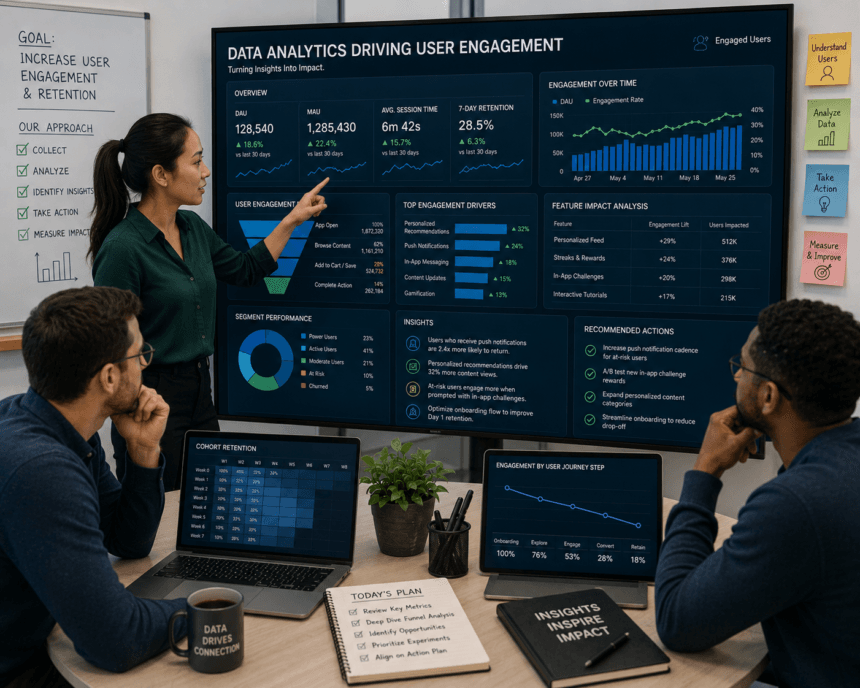
Data analytics can help companies see which pages keep people interested and which ones lose them quickly. Something that makes this useful is that businesses can compare traffic sources, device types, page layouts, content topics, and calls to action. Another thing analytics can show is whether people are scrolling, clicking, watching videos, filling out forms, or leaving before taking the next step. It is much easier to improve engagement when companies know where users are getting stuck.
Online engagement also depends on giving people content that matches their needs. There are many ways analytics can reveal what users care about, including search terms, popular pages, repeat visits, click paths, and customer questions. Something that companies can do with this information is create more helpful articles, product pages, emails, and landing pages.
Analytics can also help companies test changes instead of guessing what users want. It is possible to compare headlines, page layouts, button text, images, offers, and content length to see which versions lead to stronger engagement.
The problem with the mobile engagement funnel may not be with the funnel at all. Marketers and product managers are making extraordinary efforts to squeeze ever more value from their mobile apps, but many of these optimization strategies are implemented at the bottom of the funnel with efforts to maximize activation, usage, and conversions. Most of these are based on the assumption that push notifications are working and that failures are occurring downstream of the send.
Map the funnel before you optimize any part of it
Many growth teams work in silos. They boost CTR on notifications without considering if these notifications reach the appropriate audience. They edit the copy without addressing the issue that 40% of their iOS users never even opted in.
The mobile engagement funnel begins as soon as somebody installs the app. Prior to sending any notifications, you will be confronted with a filtering or screening issue: are you able to get in touch with this user? The opt-in rate serves as the entry point to the funnel and determines the limit for everything else. Next is the delivery rate, which is the percentage of notifications sent that are received on the user’s device. Then the open rate, followed by in-app activity. Each phase multiplies the preceding one.
Improving the opt-in rate by 10% will have a greater downstream effect than increasing the CTR by 10%, since each gain at the top multiplies the following stages. This is where you should focus first.
How to fix the opt-in problem on iOS
iOS displays the system permission prompt, and if users decline by selecting “Don’t Allow,” you won’t be able to request permission again unless they do it manually in the settings. This implies that the moment and context of the first prompt are decisive.
The common error is that the system prompt is triggered upon the first launch. Customers are not aware of the added value your app is going to provide, so they have no reason to accept notifications. The opt-in rates for iOS are around 43.9%, while for Android, it is approximately 91.1%, where automatic opt-in has been the default setting. This difference is not only based on the platform; it reveals what occurs when you ask too early versus when permission is earned.
The solution is a soft prompt approach. Before showing the system dialog, present a custom splash screen or interstitial and make clear the particular benefit derived from enabling notifications: “We’ll inform you when your order is on its way” or “Receive notifications when prices are reduced on your saved items.” Users who tap ‘Allow’ on a well-designed soft prompt are much more likely to tap ‘Allow’ on the subsequent system prompt. You pre-qualify consent rather than making a cold call.
Time-to-value is relevant here as well. The sooner a new user experiences the main advantage of your app, the more likely they are to enable notifications. If someone downloads a shopping app and immediately discovers a product they like, the opt-in prompt converts at a much higher rate than if it pops up before users have a substantial interaction.
Replace broadcast scheduling with behavioral triggers
Instead of sending the same message to everyone at a set time (“Send to all users at 10am Tuesday”), event-driven triggers engage users in contextually relevant moments. This is how we communicate in real life – by saying something when the other person is looking at us and is free to hear what we have to say.
Static campaigns can respect the schedule of a user who is in a different time zone or a different continent. They can also respect the user who is busy and would not appreciate an interruption right now. Static campaigns cannot reliably do this because they are disconnected from the user’s actual behavior when the message arrives.
In-app triggers do the same thing for your users. They see the message at the right moment because their behavior is how you decide when to show it. If users have not done the thing you’d message them about, they don’t see the message. Ever more importantly, their behavior indicates the right moment to fire the event.
If the user last read three articles five days ago and they just launched the app, it’s clear that now is the time for a re-engagement message. They are indicating through their actions “Hey, I’m free to read another article”. It’s the user’s return to the app that gives you the confidence that now is the time to fire the message – that is the user indicating that they want to re-engage.
Deep linking eliminates the navigation gap
This is one of those areas where a lot of technically competent teams leave a lot of conversion on the table. A notification fires, the user taps it, and the app opens to the home screen. Now the user has to remember why they tapped, navigate to the right screen, and pick up where they left. Most don’t.
Deep linking routes the user directly to a specific in-app destination – a product page, a checkout screen, a specific article – bypassing the home screen completely. The notification and the destination are treated as a single user journey rather than two separate events.
Technically, this means setting up URL schemes or universal links that map notification parameters to specific app routes. If the notification payload includes a “deep link” parameter, the app reads it on open and routes to the intended destination. For users who don’t have the app installed, deferred deep linking saves the routing intent and triggers it post-install, post-launch.
Since notifications and routing logic are typically managed by separate functions, getting this right typically means a dependency between the two teams. This isn’t a marketing configuration – it’s an engineering dependency. Teams that treat this as a marketing task most often end up with broken links or different behaviors based on your OS version.
Use mobile advertising analytics to track micro-conversions
Open rate is not important if you don’t know what it leads to. Mobile ad analytics help you track the entire sequence: notification sent, notification opened, time taken to open, user session post open, specific in-app actions, revenue generated. Attribution systems like AppsFlyer or Adjust sit above the app itself in the stack and track how users arrived after a notification.
Micro-conversions are the key leading indicators of macro performance and your business-specific user model will determine what they are. Maybe you’re tracking a micro-conversion that correlates well with eventual reactivation: an inactive user starting to set up their profile or entering your store locator. Maybe you’re tracking a micro-conversion that directly leads to profit.
Cart abandonment might be another signal: user adds a product to the cart, user doesn’t purchase within two hours, system sends personalized incentive. In a game, it might be a high-pressure moment followed by an event prompt.
Micro-conversions like these also help you measure whether an apparent benefit is real. If you think a feature increase will drive more purchases in a retail app because it’ll give people more room to express themselves, look for evidence that users who express themselves more already spend more, which would be a leading indicator of your core thesis based on longitudinal causality. Alternatively, look for evidence that users who start to express themselves more and didn’t previously buy are now more likely to convert, which would be a lagging indicator based on cross-sectional causality.
Rich media and lock screen actions reduce friction further
Many users interact with a notification before entering the app if you make it possible within your UI. Rich push notifications with action buttons allow a user to mark something as done, confirm an action, or take them somewhere specific right from the lock screen or notification shade.
For an e-commerce app, that’s an “Add to Cart” button right on the notification. For a food delivery app, it’s a real-time status update with a “Track Order” button that deep links to the tracking screen. For a media app, a new episode notification includes a thumbnail and a “Play Now” button.
This isn’t just a pretty face. Lock screen actions literally reduce the number of steps between notification and conversion, and on mobile, every one of those steps is a percentage of your audience.
Align paid acquisition with organic notification strategy
The transition from acquisition to retention is often missed. Someone that clicks a paid ad showing a new product of some kind, downloads the app, and is then sent generic welcome messages will churn rapidly because the promise of that ad is not being reflected in the onboarding experience.
To be successful the transition from acquisition to retention has to be managed at both sides of the process. On the acquisition side, mobile ad push notifications allow advertisers to reach users directly on device home screens before the app is ever opened. By deep linking to specific offers or content and connecting what drove an install with what the user will receive during onboarding, retention notices get measurably better at driving the user to their next session.
On the source/campaign side, the install source needs to trigger which series of notifications the user will get at first. Someone acquired through a summer sale ad off a 50%-off sale should get more offer notices, not discovery messaging. This requires the integration of acquisition platform data to roll into the user segments inside of the MMP that trigger a specific notification series.
Frequency capping and silent hours aren’t optional
Data analytics gives companies a clearer view of how people interact with their websites, apps, and digital content. Something that matters most is using the data to make user experiences easier, clearer, and more useful. Another thing companies should remember is that engagement is not only about more clicks, but about helping people find what they came for.
Companies that study user behavior can make smarter choices about content, design, and marketing. There are many benefits to knowing which pages attract attention, which messages lead to action, and which parts of the experience need work. Something that makes analytics so helpful is that it turns online engagement from a guessing game into a process that can be measured and improved over time. It is one of the best ways for companies to build stronger relationships with visitors and customers.
User fatigue exists and grows exponentially. A user who disables notifications because they’ve been bombarded doesn’t just stop there and patiently wait for next week’s send. They either uninstall immediately or remain as a ghost user, still counted in your MAU without ever viewing a message. Fatigue or no fatigue, these users will eventually go back to their devices and find your app weeks or months behind all the others.
Set frequency caps at the user level, not just the campaign level. If a user has already gotten three notifications today from different automated workflows, the fourth notification they would have received doesn’t magically become welcome because of the template you would have used. Silent hours – usually late evening and early morning – need to be enforced and based on the device’s local time, a global setting not overridden by the whims of any of the a/b test campaigns you currently have running.
Churn prediction models provide a preemptive override to this logic. If you are judging a predictive model solely on how well it scores users for a catchy re-engagement campaign, the model may need further work. The discipline here is knowing when not to send. Every notification you suppress to protect the user relationship is an investment in the engagement ceiling you’ll be able to reach next week.