Smart Data Collective is focusing on how AI is changing the name of the game with Instagram Reel marketing because short-form video has become one of the most important ways brands earn attention online. It is also becoming clear that companies can no longer treat Reels as quick side content when AI tools are helping competitors plan, create, test and refine videos at a faster pace.
Instagram Reels reward speed, relevance and consistent creative testing, which makes AI especially useful for brands that need to keep up without burning out their teams. Something that used to take hours, such as brainstorming hooks, writing captions, editing clips and choosing visual styles, can now be supported by tools that help marketers move from idea to finished Reel much faster. Keep reading to learn more.
AI Is Raising the Stakes for Instagram Reel Marketing
SurveyMonkey research shows that 88% of marketers rely on AI in their current jobs, which helps explain why AI has become such a major force in social media content planning. Another thing that stands out is how marketers are using it, since 93% use AI to generate content faster, 81% use it to uncover insights more quickly and 90% use it for faster decision-making.
“Before defining your AI goals, evaluate your current resources and identify areas where AI can add the most value. For example, if your marketing team excels at content marketing, you may not need a content AI developer. However, if you’re struggling to scale personalization efforts, AI could be a perfect solution to improve efficiency and reach,” the authors of SurveyMonkey report. It is a useful reminder that AI works best when it solves a real marketing bottleneck instead of being added just because every other brand seems to be using it.

Instagram Reel marketing depends on knowing what viewers care about before they scroll away. You can use AI to study comments, audience behavior, past posts and competitor content so your next Reel is based on stronger clues rather than guesswork. There are still creative decisions to make, but AI can give marketers a clearer starting point when they are trying to choose topics, angles and calls to action.
AI is also changing the creative side of Reels by helping brands produce more visual content without starting from scratch every time. Barry Elad of SQ Magazine reports that 71% of social media images are AI-generated, reshaping visual storytelling across platforms. Something that matters for Instagram marketers is that this shift can make it easier to test thumbnails, backgrounds, product scenes and branded graphics that support short-form video campaigns.
“This year’s data makes one thing clear: AI is transforming every corner of social media, from content creation and automation to customer care and influencer strategies. It drives higher efficiency, broader reach, and richer personalization. Yet, the path forward demands thoughtful stewardship, balancing ROI with user trust, ethics, and mental well-being. As the technology evolves, so must our standards and policies. The future of AI in social media is as promising as it is responsible, and this article charts the journey ahead,” Elad says. It is a warning that brands should move faster with AI while still protecting authenticity, trust and audience expectations.
Reels perform best when they feel native to the platform instead of looking like generic ads. Another thing AI can do is help marketers adapt one idea into multiple formats, such as a talking-head script, a product demo, a customer pain point Reel or a quick list-style video.
AI can also help smaller businesses compete with larger brands that have bigger creative teams. There are tools that can suggest Reel outlines, generate captions, repurpose blog posts into video scripts and identify stronger opening hooks. You still need human judgment to make the message sound natural, but the production process becomes much easier to manage. It is especially helpful for companies that need steady content but do not have time to plan every post from a blank page.
The best Instagram Reel strategies will still depend on credibility, personality and audience fit. You can use AI to speed up research and production, but the final content should still sound like a real brand speaking to real people.Most Reels win or lose attention in the first few seconds. If you turn webinars, podcasts, interviews, or talks into short clips, the opening line matters as much as the edit.
I reviewed these tools for marketing teams and creators who need to find strong moments fast, format them for Reels, add captions, and keep the workflow simple. Start with the first few seconds, then polish captions, crop, and pacing before posting.
How I tested these Instagram Reel tools
Source material. I looked at long interviews, webinar clips, and podcast-style recordings that needed to become short vertical videos.
Opening support. I gave more weight to tools that helped surface, score, or shape a strong first line.
Editing flow. I checked highlight selection, 9:16 reframing, captions, basic branding, and social export presets.
Reality check. These rankings are editorial. AI suggestions can save time, but they do not guarantee reach, retention, or sales.
What makes a great Instagram Reel opening?
A strong opening tells viewers why to keep watching in the first 1 to 3 seconds. It can be a clear problem, sharp claim, surprising setup, or direct promise.
The best ones feel useful, not bait-like. Pair the line with readable text, clean captions, and a quick first cut.
1. OpusClip
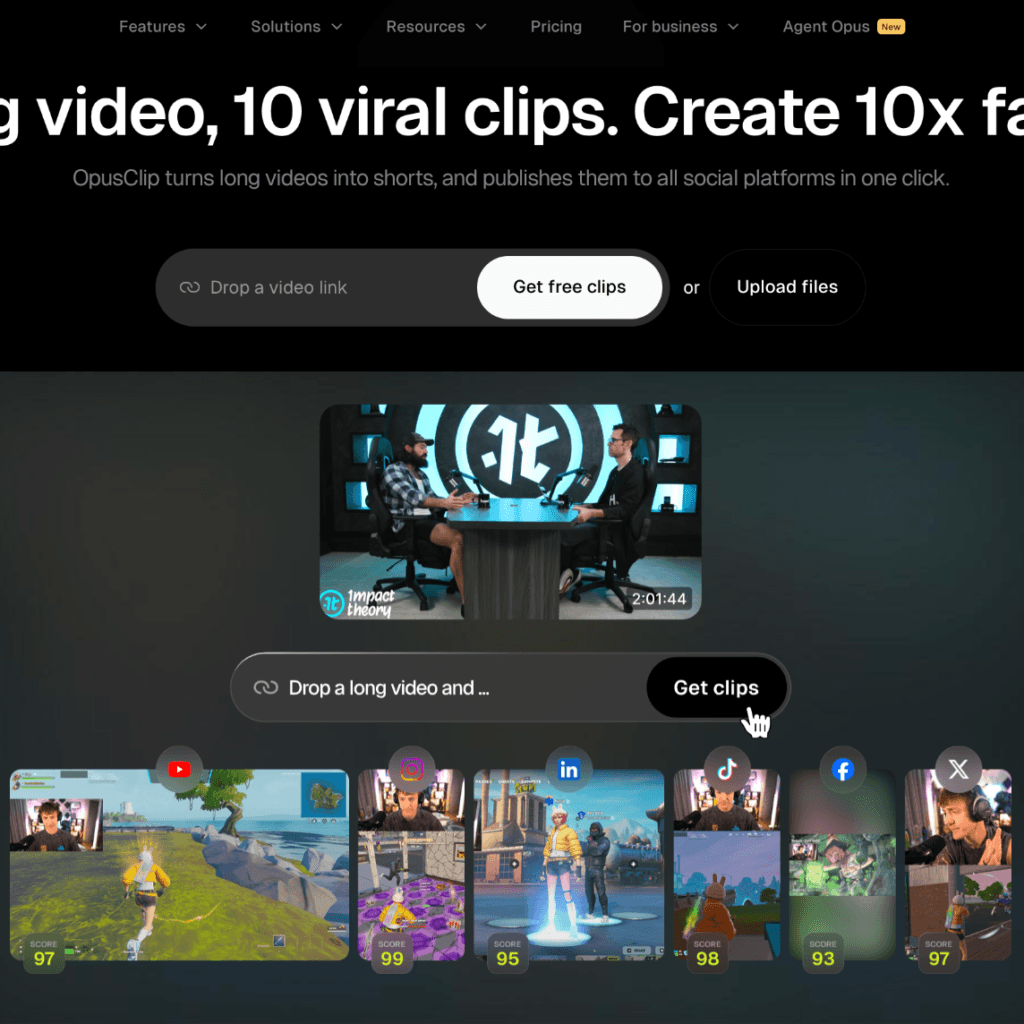
OpusClip pros
- AI Virality Score helps prioritize clips
- Built for turning one long upload into many clips
- Auto-captions in 20+ languages
- Auto-reframes clips to 9:16
- Templates speed up branded outputs
- Useful research support for opening lines
OpusClip cons
- The Virality Score is guidance, not a promise
- The editor is lighter than a full desktop video editor
My experience with OpusClip
OpusClip felt the most focused on the job I actually needed done. I could start with one long video, review AI-ranked clip candidates, then tighten the opening and captions before export.
The AI Virality Score gave me a useful first pass on which moments deserved attention. I also used OpusClip’s guide to video hooks to sanity-check the first line, then adjusted the clip so the promise matched the actual content.
I also liked the practical details: 9:16 reframing, styled captions, and a workflow that encourages batch creation. For teams clipping interviews or webinars every week, that focus is a real advantage.
OpusClip pricing
OpusClip is best judged by time saved versus manual clipping. Check the current pricing page and compare limits based on upload volume, exports, and team needs.
2. Vizard AI
Vizard AI pros
- Detects engaging highlights from long recordings
- Converts clips to vertical 9:16
- Adds subtitles for social clips
- Good for fast batch drafts
Vizard AI cons
- Clips still need a context check
- Pacing may need manual trimming
My experience with Vizard AI
Vizard AI is quick and low-friction. It worked well when an interview or webinar needed a first batch of drafts without building every cut from scratch.
I liked it most as a starting point. I still checked the first sentence, pacing, and ending so each clip made sense on its own.
Vizard AI pricing
Vizard uses tiered plans, and a free tier is available. Check current export limits, watermark rules, and team features.
3. Kapwing
Kapwing pros
- AI Instagram Script Generator tests opening styles
- AI Video Highlight Maker pulls short clips
- Strong browser editor
- Templates and brand tools help teams
Kapwing cons
- Opening-line help is more text-first
- Final cuts still need review
My experience with Kapwing
Kapwing is useful when the problem is not just finding a clip, but wording the first line. The script generator makes it easy to try a few angles before you commit.
The highlight maker adds the repurposing side, so you are not starting from a blank timeline. I would still check rhythm, caption placement, and whether the line matches the clip.
Kapwing pricing
Kapwing generally offers free and paid tiers. Review current limits for exports, watermarking, storage, and brand features.
4. Riverside Magic Clips
Riverside Magic Clips pros
- Automatically identifies key moments
- Includes Instagram Reels presets
- Good for podcast and interview teams
- Text-based fine-tuning is simple
Riverside Magic Clips cons
- Best fit if you already use Riverside
- Less suited as a standalone social editor outside Riverside
My experience with Riverside Magic Clips
Riverside Magic Clips makes the most sense inside a recording workflow. If your interviews already live there, clipping feels natural and fast.
The presets reduce setup work. It is less appealing if you need a dedicated social editor with its own deep library of styles, but it is smooth for podcast teams.
Riverside Magic Clips pricing
Magic Clips is part of Riverside plans, and feature access can vary by tier. Check recording limits, export quality, and team seats.
5. VEED.io
VEED.io pros
- AI Highlights selects strong segments
- Magic Cut removes silences and fillers
- Goal and clip-length settings shape each highlight
- Auto-framing helps keep speakers centered
VEED.io cons
- AI suggestions need editorial judgment
- More options can mean more cleanup
My experience with VEED.io
VEED.io is a good all-in-one browser editor and a clear sign of how far AI video creation has come. It gives you automation while still leaving room to polish the clip by hand.
I liked the mix of AI Highlights and Magic Cut because it removes dead space before you focus on the opening. The tool is broad, so it can feel less direct than a dedicated clipping workflow.
VEED.io pricing
VEED.io usually ranges from free access to paid business tiers. Confirm export quality, subtitle, storage, and collaboration limits.
6. Descript
Descript pros
- Text-based editing is very precise
- AI can find social-worthy highlights
- Good captions and branding controls
- Strong for podcasts and talking-head edits
Descript cons
- Not a one-click clipping factory
- Works best with editing time
My experience with Descript
Descript is the tool I would choose when control matters. Editing from the transcript makes it easy to shape the first line beat by beat.
The highlight assistance is helpful, but the real value is refinement. You can remove a slow setup and start closer to the payoff.
Descript pricing
Descript has multiple tiers with different editing and export allowances. Check plans based on transcription, video export, and team needs.
7. Pictory
Pictory pros
- Video-to-shorts workflow includes highlights
- Good for webinars and courses
- Short-form length presets help with batching
- Docs stress the first 3 seconds
Pictory cons
- Outputs can feel template-like
- Manual polish improves the final clip
My experience with Pictory
Pictory is a practical set-and-go option for longer educational content. It is useful when you need consistent clips from repeated formats that feed a steady social media strategy.
The highlight workflow keeps the process simple. I would use it for batches, then review the opener and caption style before publishing.
Pictory pricing
Pictory plans vary by usage and feature needs. Check current terms for video length, exports, branding, and short-form limits.
Conclusion
AI is changing Instagram Reel marketing because it helps brands create faster, learn faster and respond faster. Something that separates strong marketers from weak ones is how well they use AI to support better creative decisions instead of flooding feeds with forgettable content.
The brands that benefit most will be the ones that combine AI tools with a clear message, consistent testing and respect for their audience. It is not enough to post more Reels; companies need to post smarter Reels that feel timely, useful and true to the brand.
These tools can speed up the hardest part of Reel production: choosing the moment worth leading with. My top pick is OpusClip because it combines clip discovery, scoring, captions, and 9:16 formatting in one focused workflow.
Still, the tool is only part of the process. Test different first lines, watch retention, and keep refining based on what your audience responds to.
FAQs
What is the best tool for turning long videos into Instagram Reels?
OpusClip is a strong overall pick because it combines AI-ranked clip discovery, auto-captions, and 9:16 reframing in one focused workflow. It works well for teams repurposing interviews, webinars, and podcasts into short vertical clips each week.
How long should an Instagram Reel opening be?
A strong opening should tell viewers why to keep watching within the first 1 to 3 seconds. The best lines feel useful rather than bait-like and pair with readable captions and a quick first cut.
Can AI tools find the best moments in a long video automatically?
Tools like Vizard AI, VEED.io, and Riverside Magic Clips detect highlights from long recordings automatically. The suggestions still need a context check so each clip makes sense on its own before publishing.
Do AI Reel tools add captions for you?
Most tools in this space add subtitles automatically, with OpusClip supporting captions in 20+ languages. Caption styling varies by tool, so it is worth reviewing placement and readability before you post.
Are AI virality scores reliable?
A virality score is guidance for prioritizing clips rather than a promise of reach. It helps you decide which moments deserve attention first, but retention still depends on the opening line and the edit.