

Working with large datasets, training models, and testing algorithms puts a heavy load on a computer. Even a fast laptop slows down when databases, development environments, and compute jobs run at the same time. Weak hardware isn’t always the root cause. Poor memory allocation, a full drive, or a badly configured software stack will drag down performance too. Running AI and machine learning projects smoothly requires knowing which resources take the biggest hit and how to cut the extra load through practical ai ml device optimization.
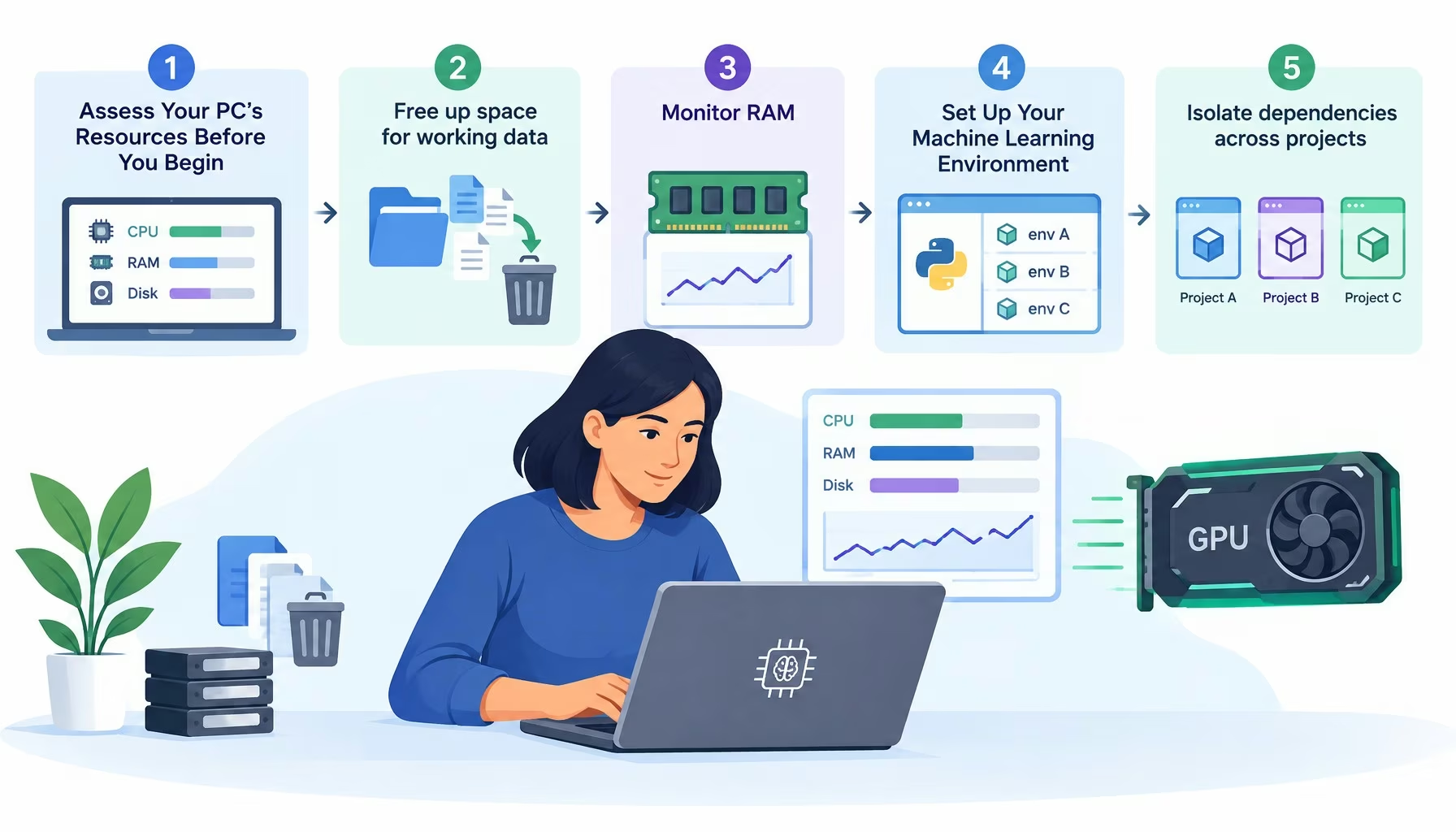
- Assess Your PC’s Resources Before You Begin
- Set Up Your Machine Learning Environment
- Optimize a Daily Data Workflow
- Comparison Table: Key Optimization Areas Compared
- Keeping Your Local ML Setup Running Smoothly
- Frequently Asked Questions
- How much RAM is required for local machine learning and AI development?
- How can I stop my computer from running out of RAM during machine learning tasks?
- Why should I use virtual environments like venv or Conda for AI projects?
- Why is Apache Parquet significantly faster than CSV in Pandas pipelines?
- What is the best file format for storing cleaned datasets in a local workflow?
- How do you verify if PyTorch is actively utilizing local GPU acceleration?
- How can data engineers prevent thermal throttling during long training runs on laptops?
Data professionals optimize their devices for AI and ML projects by clearing unused local datasets and checkpoints, managing RAM through batch loading and column type tuning, isolating Python dependencies in virtual environments, and routing supported matrix operations to the local GPU.
- Before deleting anything, inspect the flagged files so you do not wipe out active datasets or test results.
- Give each project its own isolated environment using venv or Conda to prevent routine library updates from breaking code.
- For data analytics tasks, save cleaned datasets in the Parquet format to cut down disk reads.
Assess Your PC’s Resources Before You Begin
Before changing system settings, data professionals need to pinpoint what’s holding the machine back. Run a typical workflow and check usage across these components:
- Central Processing Unit (CPU)
- Random Access Memory (RAM)
- Storage
- Graphics accelerator (GPU)
Free up space for working data
ML projects usually generate plenty of local files:
- Large datasets
- Intermediate processing outputs
- Model checkpoints
- Temporary files
In typical local workflows, old experiments and duplicate files sit unused while eating up gigabytes of storage space. On a Mac, check disk usage under System Settings → General → Storage. If the built-in tools fall short, this overview of the best free Mac cleaner breaks down which apps spot large files, leftover app data, and redundant copies. Free tiers often cap certain features, so check the terms of use first. Before deleting anything, inspect the flagged files so you don’t wipe out active datasets, virtual environments, or test results. Once storage is clean, turn to the resources that directly control compute speed.
Monitor RAM
When processing large tables, Pandas often creates extra copies of the data in memory. If free RAM runs out, the OS starts paging memory to the disk. That swap slows execution to a crawl.
Track memory usage through Activity Monitor on macOS or Task Manager on Windows.
When handling large datasets, stick to three habits:
- Load data in batches
- Optimize column data types
- Shut down idle background apps
Set Up Your Machine Learning Environment
A clean software setup prevents package conflicts and broken dependencies. Optimizing an AI project goes beyond raw code speed. Reproducing experimental results reliably matters just as much.
More Read

Isolate dependencies across projects
Python libraries frequently demand different versions of the exact same packages. Give each project its own isolated environment using venv or Conda.
Pin exact dependency versions in your configuration files. Doing so makes moving projects between machines much simpler and prevents routine library updates from breaking your code.
Avoid updating ML tools right before a major model deployment. Test new versions against your existing code first to confirm everything still runs.
Check GPU capabilities
A graphics processing unit speeds up neural network training by running matrix math in parallel.
How much speed you actually gain depends on three things:
- Model architecture
- Library support
- Available video memory (VRAM)
Machine learning engineers frequently evaluate model efficiency through metrics such as parameter count, floating-point operations, and computational complexity, but these measurements do not fully explain how a model will perform on the hardware used for training or inference.
Santosh Rout, Author at InterviewNode, in Hardware-Aware Machine Learning, in Santosh Rout, Hardware-Aware Machine Learning: Designing Models Around the Compute …On Apple silicon Macs, PyTorch runs calculations through Apple’s Metal framework. This shifts supported operations from the CPU to the GPU. However, this mode doesn’t support every data type or operation yet. Check the official PyTorch docs for full compatibility details. Before starting a training run, verify that your script actually routes work to the right compute device.
Optimize a Daily Data Workflow
Good device performance also comes down to daily workflow habits. Reloading the same raw files and repeating finished calculations wastes compute cycles without improving output.
Reduce unnecessary operations
For data analytics tasks, save cleaned datasets in the Parquet format. It compresses files and lets you read specific columns without loading the whole table, cutting down disk reads compared to parsing huge CSVs over and over.
In Jupyter Notebook, restart the kernel whenever old variables and objects pile up in memory. During long training runs, save intermediate checkpoints so a sudden crash doesn’t force you to restart the whole job from the beginning.
Maintain device stability
Sustained heavy loads heat up the processor and trigger thermal throttling, which drops clock speeds. Keep your laptop well-ventilated during long compute jobs.
Keep an eye on background processes, install vetted OS updates, and back up your core files regularly.
Comparison Table: Key Optimization Areas Compared
| Optimization Area | Common Bottleneck | Primary Action | Tools / Formats Mentioned | Key Outcome |
|---|---|---|---|---|
| Local Storage | Unused experiments, model checkpoints, and duplicate files eating gigabytes of space | Inspect flagged files and clear old checkpoints and cached datasets | macOS System Settings, Mac cleaner utilities, Parquet format | Frees disk space for temporary files and cuts down disk reads |
| RAM Management | Pandas creating extra copies of large tables in memory, causing OS disk paging | Load data in batches, optimize column data types, and restart Jupyter kernels | Activity Monitor (macOS), Task Manager (Windows), Pandas, Jupyter Notebook | Prevents memory swaps to disk and maintains execution speed |
| Software Environment | Python libraries demanding conflicting versions of the same packages | Create isolated per-project environments and pin exact dependency versions | venv, Conda | Prevents broken dependencies and ensures reproducible experimental results |
| GPU Acceleration | Heavy neural network matrix math overloading the CPU or hitting unsupported operations | Verify library support, check available VRAM, and route supported operations to the GPU | PyTorch, Apple Metal framework (MPS) | Speeds up neural network training through parallel matrix calculations |
| Device Stability | Sustained heavy compute loads heating the processor and triggering thermal throttling | Keep laptop well-ventilated, shut down idle apps, and save intermediate checkpoints | OS updates, local backups | Prevents clock speed drops and protects long training runs from crashes |
Keeping Your Local ML Setup Running Smoothly
Hardware specs alone don’t dictate how well a machine handles ML workloads. Four practical factors drive day-to-day data processing speed:
- Free disk space
- Smart RAM usage
- Clean software library environments
- Proper GPU setup
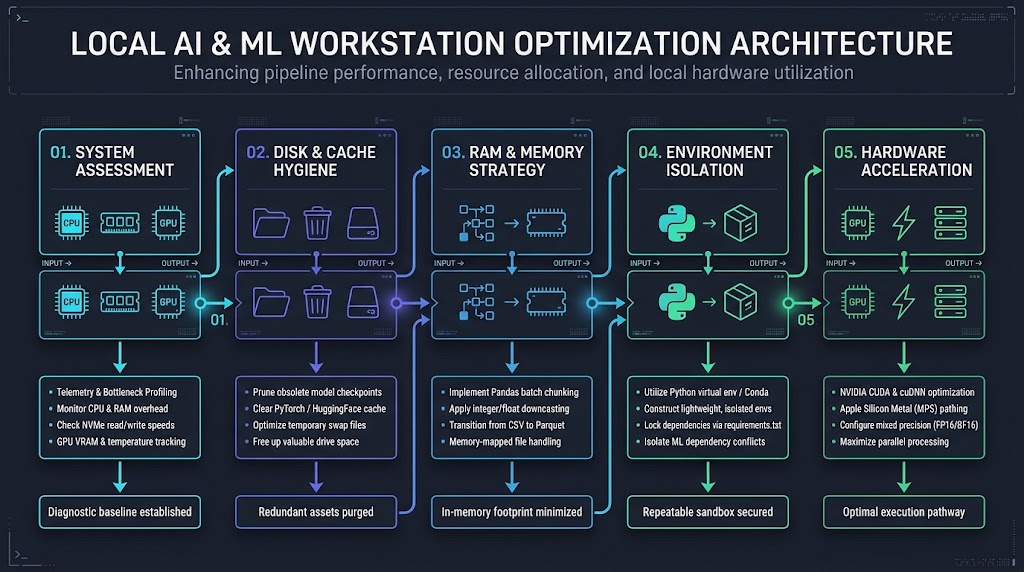
Checking these pieces regularly cuts down compute times, prevents crashes, and keeps your local setup ready for heavier projects.
When reviewing your workstation before a new run, focus on four practical habits across your setup. Clear out old checkpoints and cached datasets so the OS always has room for temporary files and swap space. Load large tables in batches and downcast numeric columns to keep Pandas from exhausting RAM. Lock exact package versions inside isolated venv or Conda environments, and store cleaned tables as Parquet files while verifying your training scripts target the GPU.
Frequently Asked Questions
How much RAM is required for local machine learning and AI development?
For classical tabular machine learning workflows using Scikit-Learn or XGBoost, 16 GB to 32 GB of high-speed system memory is the practical operational baseline. For deep learning training and running quantized local large language models (such as 7B or 8B parameter models quantized to 4-bit weights), 32 GB to 64 GB of system RAM or unified memory on Apple Silicon systems is strongly recommended to prevent operating system disk paging and swap thrashing.
How can I stop my computer from running out of RAM during machine learning tasks?
To prevent memory exhaustion and slow disk swapping when processing large tables, load your datasets in smaller batches, optimize column data types to use less memory, and close idle background applications. In Jupyter Notebook, you should also restart the kernel periodically to clear out old variables and objects that accumulate in RAM.
Why should I use virtual environments like venv or Conda for AI projects?
Python machine learning libraries often require conflicting versions of the exact same dependencies. Creating an isolated environment with venv or Conda for each project and pinning exact package versions prevents routine updates from breaking your code and makes it much easier to reproduce results across different machines.
Why is Apache Parquet significantly faster than CSV in Pandas pipelines?
CSV files store data in uncompressed plain text, requiring Pandas to parse every character sequentially and infer data types, which often consumes three to five times the original file size in active RAM. In contrast, Apache Parquet uses a binary columnar format equipped with Snappy or Zstandard compression and embedded schema metadata. This architecture allows data analysis engines to read only the specific columns needed for a feature set without loading the entire dataset into memory.
What is the best file format for storing cleaned datasets in a local workflow?
Saving cleaned datasets in the Parquet format is ideal for local data workflows. Parquet compresses files to save disk space and allows you to read specific columns without loading the entire table into memory, which significantly reduces disk read times and RAM usage.
How do you verify if PyTorch is actively utilizing local GPU acceleration?
You can verify hardware acceleration directly in Python by testing backend availability. For NVIDIA systems on Windows or Linux, execute torch.cuda.is_available() and check torch.cuda.get_device_name(0). On Apple Silicon Macs, verify Metal acceleration by running torch.backends.mps.is_available() and assigning tensors to device = torch.device("mps"). If both checks return False, PyTorch will default to CPU execution.
How can data engineers prevent thermal throttling during long training runs on laptops?
Sustained matrix multiplication pushes modern mobile processors to their thermal ceilings within minutes. To prevent aggressive CPU and GPU clock down-throttling, elevate your laptop on an open stand or active cooling pad to maximize fan intake airflow, switch operating system energy profiles to dedicated high-performance modes, and implement mixed-precision training (such as PyTorch AMP with FP16 or BF16) to cut computational thermal wattage by up to 40%.