
Something that we have written a lot about at Smart Data Collective is how modern companies depend on structured databases like MySQL to store and analyze growing volumes of information. It is clear that when these systems fail due to unexpected shutdowns, the ripple effects can disrupt operations, delay decisions, and even lead to permanent data loss.
A report by Naveen Kumar of DemandSage reports that around 97% of businesses use big data, showing just how widespread database reliance has become. Something that stands out is his observation that “The top reasons contributing to the rapid growth of the big data analytics market are the exponential rise in data volume, growing demand for cloud computing applications, and digital transformation across all industries… Most small businesses say that data collection isn’t their priority. Hence, even if they use the technology, they do not have large data sets for analysis.” Keep reading to learn more.
Why MySQL Downtime Can Put Data-Driven Businesses at Risk
You rely on MySQL databases to manage customer records, transactions, and analytics pipelines that keep your business moving forward. Another thing to consider is that sudden power loss or improper shutdowns can corrupt tables, damage indexes, and leave systems in an inconsistent state.
It is often overlooked that even a brief interruption can trigger cascading failures across connected applications and services. There are cases where incomplete writes or interrupted queries leave behind partial data that becomes difficult to repair without backups. Something that many teams miss is how recovery time increases when proper safeguards are not in place, leading to lost productivity.

Another thing that raises concern is the financial risk tied to database failures and breaches. A report by Brenda Buckman of Huntress reports that the average cost of a data breach has reached $4.4 million globally, and she explains “It’s actually multiple millions when it comes to the average cost of a data breach, including both direct and indirect costs. But because of those indirect and long-term costs, there’s actually no way to know how high the total costs of the biggest data breaches may be. Perhaps, billions of dollars?”
Something that becomes clear is that preventing downtime is not just about uptime metrics but about protecting long-term business stability. You can reduce risks by implementing backup strategies, replication systems, and regular integrity checks that ensure your data remains intact.
There are also technical solutions like uninterruptible power supplies and automated shutdown scripts that help prevent corruption during outages. It is helpful to configure MySQL with proper logging and recovery settings so that crashes do not lead to unrecoverable damage. Another thing worth noting is that routine testing of recovery procedures ensures your team can respond quickly when issues arise.
You can also take advantage of cloud-based database hosting that offers built-in redundancy and failover support. Something that many organizations adopt is real-time replication across multiple servers, which allows systems to continue running even if one node fails.
It is common for businesses to underestimate how small configuration errors can increase vulnerability during shutdowns. There are preventive measures like transaction-safe storage engines and consistent backup schedules that minimize exposure. Another thing to remember is that monitoring tools can alert you to early warning signs before failures occur. Something that improves resilience is combining these tools with clear operational procedures.
You should also train your team to follow proper shutdown and restart protocols to avoid accidental damage. It is often the human factor that introduces risk when systems are not handled carefully under pressure.
While working on MySQL Server, situations may arise where your application becomes unresponsive or frozen, leaving you with no choice but to forcefully shutdown your system to regain control. Such a sudden shutdown can lead to corruption in MySQL tables or crashed tables. When this happens, you may fail to open or access the tables or unable to run queries on them. Sometimes, you encounter errors such as “Column count of mysql.proc is wrong. Expected 20, found 16. The table is probably corrupted”, “Table ‘.\mysql\db’ is marked as crashed and should be repaired”, etc.
You can repair or restore crashed MySQL tables after a system shutdown by using mysqldump utility or PhpMyAdmin tool if you have an updated backup (dump file). If the backup is obsolete or not available, then you can run the myisamchk command or use the dump or reload method. The best choice in this situation is to use a professional tool to repair corrupted MySQL database without any data loss. In this article, we will discuss all these methods in detail to help you repair crashed tables after a system shutdown.
Methods to Repair Crashed MySQL Tables after System Shutdown
To repair crashed tables, follow the methods discussed below.
Method 1: Restore the Dump File (Backup)
If you have created a backup of the MySQL database file, then you can easily restore the file from backup. There are multiple methods available to do this. If you’re using the Workbench, then you can use the Import/Export wizard to restore your dump file. To perform this, go to the Management section under Navigator in MySQL Workbench and then click Data Import/Restore. Next, select the dump file and start Import.
You can even use the command-line tool mysqldump to restore the corrupt MySQL database from backup. But you should have all privileges and roles on your account to run it without errors. First, confirm this and then open a CMD window on your system. Now, run these commands one-by-one:
Mysql>DROP DATABASE test;
CREATE DATABASE test;
mysql -u root -p test< dumpfile.sql
Method 2: Use PhpMyAdmin Utility
To repair crashed MySQL tables, you can use the PhpMyAdmin tool. It is an open source tool to repair InnoDB and MyISAM tables. To use this tool, follow these steps:
• In phpMyAdmin login window, enter the required credentials.
• Next, in PhpMyAdmin cPanel, click the Databases tab from the main menu. This will open a list of MySQL databases.
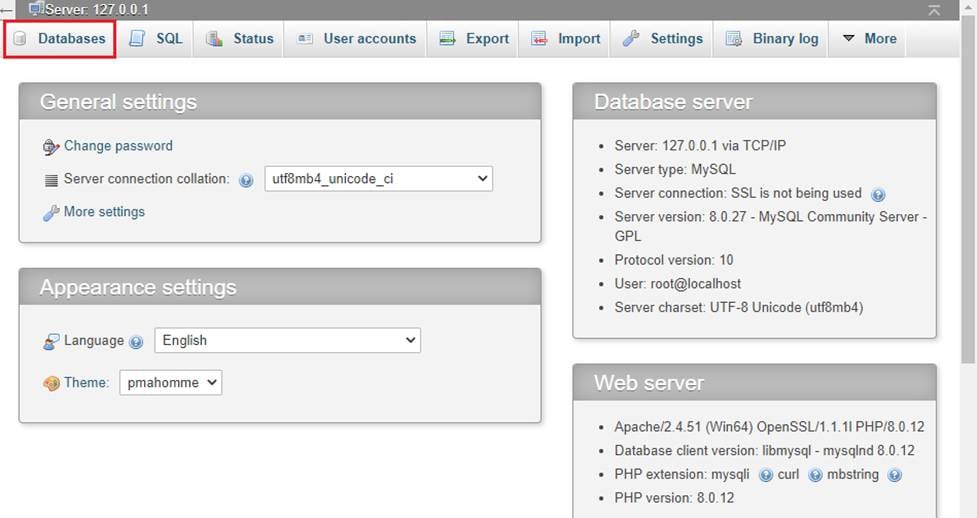
- Click on the corrupt database.
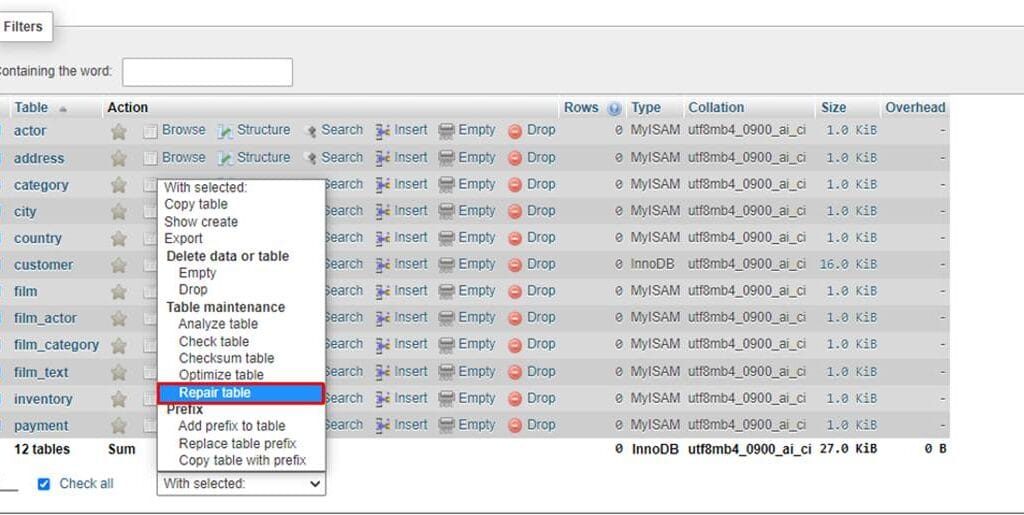
• A list of all the tables in MySQL database will open. Click Check All to select and repair all the tables. Once the tables are selected, expand the ‘With selected:’ dropdown, and then select the Repair Table option.
Method 3: Use myisamchk Command
If you’re using the MyISAM storage engine, then you can use myisamchk command to recover data from the corrupt tables. It works after you stop the MySQL Server. Here is how to use it:
myisamchk –recover TABLE_name
Next, restart your MySQL Server.
Method 4: Use the Dump and Reload Method
InnoDB engine tries automatic crash recovery after a system shutdown. If it fails, you can restart the MySQL Server with forced InnoDB recovery to access the tables, then use mysqldump to export and re‑import the database. This dump and reload process helps to rebuild the tables and restore them to a stable state. To perform this, follow these steps:
• If MySQL fails, then enable `innodb_force_recovery` in `my.cnf` (start with level 1 and increase only if required).
Note: Changing the level to greater than 4 can cause data loss.
• Restart the MySQL Server to regain access to tables.
• Next, export the database to a backup file using the `mysqldump’ utility by following command:
For a single table:
mysqldump -u user -p database_name table_name > single_table_dump.sql
For an entire database:
mysqldump -u user -p database_name > database_dump.sql
• Now, comment in the innodb_force_recovery setting in my.cnf.
• Restart MySQL normally.
•Drop and recreate affected databases or tables if necessary.
•Reload the dump to rebuild tables.
If you want a detailed video tutorial about InnoDB recovery, you can refer to a step-by-step video explanation as well.
Method 5: Use an Advanced MySQL Repair Tool
To repair MySQL crashed tables quickly and easily without data loss, you can use a specialized MySQL repair tool – Stellar Repair for MySQL. It can repair both InnoDB and MyISAM tables, even if they are severely corrupted. The tool can recover all the data, like tables, indexes, primary keys, foreign keys, etc. with 100% integrity.
Here are the top features of the tool:
- Repairs corrupt MySQL tables of both storage engines – InnoDB and MyISAM – with absolute precision
- Repairs multiple MySQL databases (in a batch) of any size and state
- Supports selective recovery of MySQL database objects
- Saves repaired files in different formats – MySQL, MariaDB, SQL Script, CSV, HTML, and XLS
- Resolves complex MySQL corruption errors
- Compatible with both Windows and Linux operating systems
- Allows you to see a preview of recoverable data after repair
Conclusion
Something that ties all of this together is the idea that data-driven businesses must treat database stability as a core priority rather than an afterthought. You can build stronger systems by combining technical safeguards with clear processes that reduce the chances of failure.
Another thing to keep in mind is that preparation determines how well a business recovers from disruptions. It is possible to avoid major losses by planning ahead, maintaining backups, and ensuring that your MySQL environment is always ready to handle unexpected shutdowns.
With the methods shared in this article, you can easily repair crashed or corrupted MySQL tables. You can quickly recover the crashed MySQL tables from the backup (dump file). If you can’t find the dump file or it is not accessible, then you can use an advanced MySQL repair software such as Stellar Repair for MySQL. It can easily recover your tables that are showing as crashed due to severe corruption. It has no file-size and storage engine restrictions. It can easily repair tables with complete integrity.