Cookies help us display personalized product recommendations and ensure you have great shopping experience.

By using this site, you agree to the Privacy Policy and Terms of Use.
Accept
SmartData CollectiveSmartData Collective
  • Analytics
    AnalyticsShow More
    How Data Analytics Is Reshaping Patient Financing Decisions
    How Data Analytics Is Reshaping Patient Financing Decisions
    13 Min Read
    business using business intelligence
    How to Use a Competitive Intelligence Dashboard to Turn Market Data Into Smarter Marketing Decisions 
    9 Min Read
    unusual trading activity
    Signal Or Noise? A Decision Tree For Evaluating Unusual Trading Activity
    3 Min Read
    software developer using ai
    How Data Analytics Helps Developers Deliver Better Tech Services
    8 Min Read
    ai for stock trading
    Can Data Analytics Help Investors Outperform Warren Buffett
    9 Min Read
  • Big Data
  • BI
  • Exclusive
  • IT
  • Marketing
  • Software
Search
© 2008-25 SmartData Collective. All Rights Reserved.
Reading: SAS ODS Report Writing Interface: A Quick Demo
Share
Notification
Font ResizerAa
SmartData CollectiveSmartData Collective
Font ResizerAa
Search
  • About
  • Help
  • Privacy
Follow US
© 2008-23 SmartData Collective. All Rights Reserved.
SmartData Collective > Big Data > Data Visualization > SAS ODS Report Writing Interface: A Quick Demo
Big DataData VisualizationSoftware

SAS ODS Report Writing Interface: A Quick Demo

JiangtangHu
JiangtangHu
5 Min Read
SHARE

using ODS

using ODS

I personally nominated SAS ODS Report Writing Interface as one of the best technologies I found in SAS in 2012. It can generate reports cell by cell and row by row and provides a lot of flexibility to produce highly customized reports. Basically, to use it,

  • first assign an ODS destination. Nothing new, and I prefer HTML like

ods html   file=”output.html” style=sasweb;

  • then create a object(instance) based on the ODS Report Writing class, odsout,

declare odsout myout();

ODS Report Writing Interface holds some so-called object-oriented features. Odsout is a predefined class (or, a SET, a CONTAINER), then you take from it an instance or an object, myout(or any other legal SAS variable names). Suppose Odsout is a class for apples, then myout is a specific apple.

More Read

big data helping students lending
Can Big Data Solve The Student Loan Crisis? Here’s What To Know
Forrester: Companies That Don’t Integrate Social Data Fail in the Age of the Customer
8 Features of a True Enterprise-Grade Platform for Hadoop and NoSQL
Salary Changes for Quant Workers: What Can You Expect?
The Netflix Prize and Freeing Data Analytics
  • apply methods associated with the Odsout class, like CELL, ROW, TABLE to generate reports.

Roughly methods are just the functions (subroutines, procedures) in the object oriented world. For example, in SAS Data Steps, you use function weight(apple) to get the weight of the apple; in object oriented world, you use apple.weight() to return the same thing. In ODS Report Writing Interface, if you want to get a table, use TABLE methods:

    • myout.TABLE_START() to start a table
    • myout.TABLE_END to end a table

Then all we need to do next is to use the flexible SAS data steps to leverage the ODS Report Writing Interface methods (see docs). The codes, you can see below, are pretty verbose compared to its counterparts, PROC REPORT, but that’s why it gains power to build highly customized reports. It’s also very structural (and easy to build, like playing blocks):

/*making a sortable HTML table*/
%macro ods_html_sort_table;


%mend;

title ;
ods listing close;
ods html   file=”a:\test\iris.html” style=sasweb headtext=”%ods_html_sort_table”;

data _null;
    set sashelp.iris;
    by Species;
   
/*    create an object, obj, based on the ODS Report Writing class, odsout*/
    if _n_ = 1 then do;
        dcl odsout obj();
    end;

    if (first.Species) then do; *by group processing;
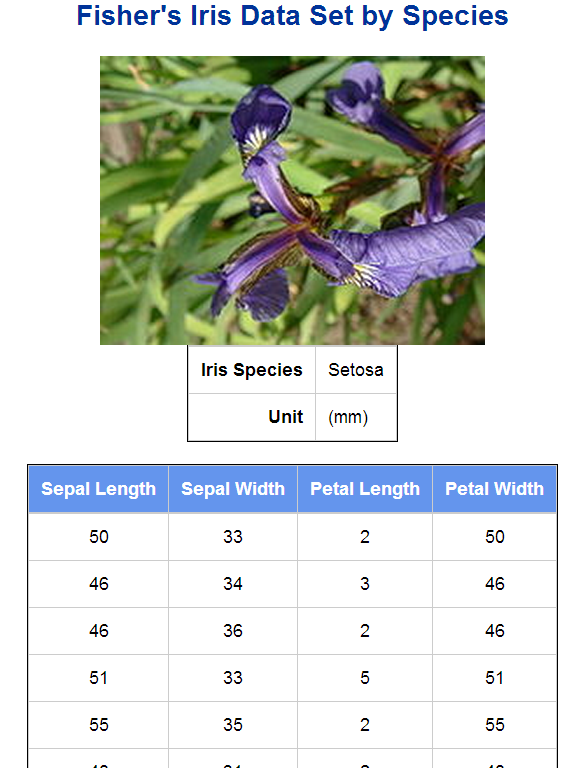
       obj.title(text: “Fisher’s Iris Data Set by Species”); *title;

/*       start a table*/
       obj.table_start();
               obj.row_start();
              if (Species = “Setosa”) then
                 obj.image(file: “Iris_setosa.jpg” );*insert image;
              else if (Species = “Versicolor”) then
                 obj.image(file: “Iris_versicolor.jpg” );
              else if (Species = “Virginica”) then
                 obj.image(file: “Iris_virginica.jpg” );
            obj.row_end();

            obj.row_start();
                obj.format_cell(text: “Iris Species”,  overrides: “fontweight=bold just=right” );
                obj.format_cell(text: Species, column_span: 3, overrides: “just=left”);
            obj.row_end();

            obj.row_start();
                obj.format_cell(text: “Unit”,  overrides: “fontweight=bold just=right” );
                obj.format_cell(text: “(mm)”, column_span: 3, overrides: “just=left”);
            obj.row_end();
       obj.table_end();

       /* start another table */
       obj.table_start();
            obj.head_start();
                obj.row_start();
                    obj.format_cell(text: “Sepal Length” , overrides: “fontweight=bold”);
                    obj.format_cell(text: “Sepal Width” , overrides: “fontweight=bold”);
                    obj.format_cell(text: “Petal Length” , overrides: “fontweight=bold”);
                    obj.format_cell(text: “Petal Width” , overrides: “fontweight=bold”);
                obj.row_end();
            obj.head_end();
    end;

        obj.row_start();
            obj.format_cell(data: SepalLength);
            obj.format_cell(data: SepalWidth);
            obj.format_cell(data: PetalWidth);
            obj.format_cell(data: SepalLength);
        obj.row_end();

    if (last.Species) then do;
        obj.table_end();

        obj.note(data: “Note: These Tables are Sortable.”); *note;

        obj.foot_start(); *footer;
            obj.row_start();
                obj.cell_start();
                    obj.format_text(data: “Footer: Data from SAS V&sysver at &sysscp &sysscpl Sashelp.iris”,just:”C”);
                obj.cell_end();
            obj.row_end();
        obj.foot_end();

        obj.page();
    end;
run;

ods html close;
ods listing;

Note:

    • A flavor added to get a sortable HTML report. Thanks to Charlie Huang and then Andrew Z to introduce a Javascript library JQury to SAS HTML report.
    • The full report, see here.
    • If column spannings needed, use the following codes as header (and the report here):

obj.head_start();
    obj.row_start();
        obj.format_cell(text: “Sepal” , overrides: “fontweight=bold”,column_span: 2);
        obj.format_cell(text: “Petal” , overrides: “fontweight=bold”,column_span: 2);
    obj.row_end();

    obj.row_start();
        obj.format_cell(text: “Length” );
        obj.format_cell(text: “Width” );
        obj.format_cell(text: “Length” );
        obj.format_cell(text: “Width” );
    obj.row_end();
obj.head_end();

  • ODS Report Writing Interface will get rid of its preproduction hat since SAS 9.4, but you can use it somehow since SAS 9.1.3. For more, see the draft SAS 9.4 ODS documentation with ODS Report Writing Interface.
  • To get started, see the developer’s paper.
TAGGED:ODSprogrammingsas
Share This Article
Facebook Pinterest LinkedIn
Share

Follow us on Facebook

Latest News

How Data Analytics Is Reshaping Patient Financing Decisions
Analytics Big Data Exclusive
AI driven big data company
How AI-Driven Workflows Are Changing the Way Companies Think About Data Risk
Artificial Intelligence Data Management Exclusive Risk Management
ai product development
Why Businesses Outsource AI Product Development Companies
Exclusive News
banking tools
The Fintech and Banking Tools Global Entrepreneurs Rely On
Fintech Infographic

Stay Connected

1.2KFollowersLike
33.7KFollowersFollow
222FollowersPin

You Might also Like

Integrating data and text analysis

9 Min Read

Gartner’s 2009Q1 Magic Quadrant for BI Platforms

5 Min Read

Rescue Squad – A Validation of Performance Management Software

3 Min Read

SAS Visual Analytics: What’s Happening to SAS BI?

7 Min Read

SmartData Collective is one of the largest & trusted community covering technical content about Big Data, BI, Cloud, Analytics, Artificial Intelligence, IoT & more.

AI and chatbots
Chatbots and SEO: How Can Chatbots Improve Your SEO Ranking?
Artificial Intelligence Chatbots Exclusive
ai is improving the safety of cars
From Bolts to Bots: How AI Is Fortifying the Automotive Industry
Artificial Intelligence

Quick Link

  • About
  • Contact
  • Privacy
Follow US
© 2008-25 SmartData Collective. All Rights Reserved.
Welcome Back!

Sign in to your account

Username or Email Address
Password

Lost your password?