

These 10 platforms offer ways to turn raw qualitative data into business intelligence: Conveo, Dovetail, Marvin, Thematic, Qualtrics, NVivo, ATLAS.ti, MAXQDA, Condens, and Looppanel. Conveo collects and analyzes brand-new interviews. Several tools focus on parsing data you already hold, from existing call transcripts to open-ended survey responses. Marvin also offers AI-moderated interviews, and Qualtrics collects survey responses.
- How the 10 platforms compare at a glance
- 1. Conveo: interviews with traceable findings
- 2. Dovetail: a searchable research repository
- 3. Marvin: AI analysis for interviews
- 4. Thematic: open ends at volume
- 5. Qualtrics: AI analytics for survey open ends
- 6. NVivo: detailed qualitative coding
- 7. ATLAS.ti: AI coding with manual control
- 8. MAXQDA: mixed-methods analysis
- 9. Condens: a shared research repository
- 10. Looppanel: fast notes on user interviews
- How qualitative findings stay linked to the evidence
- Choose among the 10 tools by the research work you need to do
Choose AI market research tools by the material you need to collect or analyze. Compare interview workflows, survey-text analysis, repositories, and coding tools against your own study. Check source traceability and edition-specific features before choosing a plan. Use a sample of your own material during the evaluation.
Key takeaways
- Several tools analyze existing call transcripts and open-ended survey responses; Conveo and Marvin also offer AI-moderated interviews.
- Start with your own transcripts or survey responses when testing the workflow.
- Check how a theme links to its supporting material and which features belong to the edition or add-on.
That split matters. When teams collect more qualitative data than they have time to code, analysis becomes a bottleneck. When transcripts and customer verbatims pile up unread, the choice of analysis platform affects how that backlog is handled.
How the 10 platforms compare at a glance
| Platform | Workflow to evaluate | Data it handles |
|---|---|---|
| Conveo | Enterprise consumer research programs | AI-moderated video and voice interviews |
| Dovetail | Central research repository | Interviews, notes, and feedback |
| Marvin | Interview notes, analysis, and AI-moderated interviews | Recordings and transcripts |
| Thematic | Open ends at high volume | Survey verbatims and reviews |
| Qualtrics | Survey-led experience programs | Open-ended survey responses |
| NVivo | Qualitative coding; check Cloud vs Desktop | Transcripts, documents, and media |
| ATLAS.ti | AI-assisted coding with manual control | Transcripts, documents, and media |
| MAXQDA | Mixed-methods analysis; AI Assist is an add-on | Text, media, and survey data |
| Condens | Shared research repository | Interviews and notes |
| Looppanel | Fast notes on user interviews | Call recordings and transcripts |
1. Conveo: interviews with traceable findings
Conveo runs AI-moderated interviews. Its product page describes a workflow covering research study design, recruitment, interviews, analysis, and insight sharing. Ask to see the supporting interview material when reviewing a finding.
Insights teams comparing AI market research tools often shortlist Conveo when they need fresh customer conversations alongside automated analysis. Check language availability, participant verification, and the scope of the study with the vendor. This article does not independently test turnaround-time claims.
2. Dovetail: a searchable research repository
Dovetail pulls interviews, project notes, and user feedback into one central hub. Its AI engine summarizes text, applies tags, and surfaces recurring patterns across projects so teams can search past work before commissioning new studies.
For organizations struggling with lost findings, check how the repository makes past work searchable. Confirm how your recording and interviewing tools connect before choosing a plan.
3. Marvin: AI analysis for interviews
Marvin records or imports user interviews and generates transcripts. Its pricing page describes an AI notetaker for live calls and notes linked to source moments. It also advertises AI-moderated interviews; it is not limited to analyzing existing recordings.
Product and UX teams running their own discovery calls can evaluate this workflow. If you do broad consumer work, test how well its tagging handles research outside software products.

4. Thematic: open ends at volume
Thematic ingests high volumes of open-ended feedback – including survey verbatims, app reviews, and support tickets – and clusters them into clear themes. You can then track how those themes shift over time.
CX and insights teams can use these themes to examine patterns in customer comments. Short comments rarely explain root causes, so plan follow-up interviews whenever a specific theme demands deeper context.
5. Qualtrics: AI analytics for survey open ends
Qualtrics is an enterprise experience management suite equipped with AI text analytics for open-ended survey responses. Teams already running surveys on the platform can analyze written verbatims right next to their quantitative scores.
This setup fits large, survey-led enterprise programs. Check which Text iQ functions are included in your license and how interview material would enter your workflow.
6. NVivo: detailed qualitative coding
NVivo is long-established qualitative analysis software widely used across academic and agency research. NVivo Cloud includes AI-assisted coding and summaries for imported sources, according to Lumivero. Cloud and Desktop are distinct offerings; check the edition before comparing features.
Researchers who demand manual control and an audit trail should check the coding workflow. Lumivero says NVivo Cloud links AI-generated themes, codes, and insights back to source data.
7. ATLAS.ti: AI coding with manual control
ATLAS.ti pairs AI-suggested codes with traditional manual workflows, letting researchers accept, edit, or reject every AI proposal. The platform handles text, audio, video, and image files.
Teams use it when they want AI to speed up an initial pass without giving up ownership of the codebook. Feature sets differ between the desktop and web versions, so verify which environment fits your workflow.
8. MAXQDA: mixed-methods analysis
MAXQDA blends qualitative coding with mixed-methods tools so analysts can link coded themes directly to quantitative survey variables. Its AI Assist add-on summarizes documents and recommends codes; confirm the add-on terms separately from the core software.
Teams that report qualitative and quantitative findings side by side can evaluate this workflow. Test it with your own coding scheme and survey variables.
9. Condens: a shared research repository
Condens is a research repository offering transcription, tagging, and synthesis. Its documentation describes AI-generated quotes and themes backed by direct citations so researchers can check the source.
Teams standing up their first shared repository can evaluate its tagging and sharing workflow. Larger enterprise insights functions should check how the system scales across multiple global markets and concurrent studies.
10. Looppanel: fast notes on user interviews
Looppanel records and transcribes user calls, using AI to organize notes by each question in your discussion guide. Researchers can then tag responses and build themes across multiple calls.
UX researchers running back-to-back interviews can evaluate its question-based notes. Test whether its tagging and cross-call analysis fit your study design.
How qualitative findings stay linked to the evidence
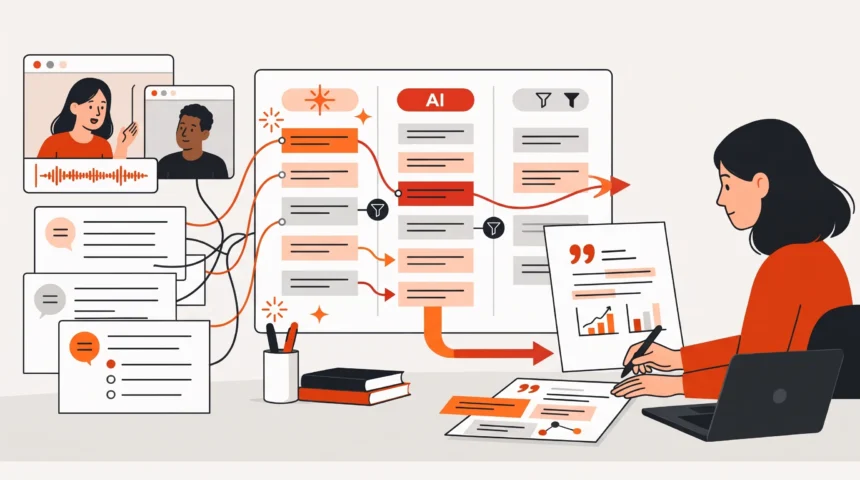
Keep a path back to the source when using AI-assisted themes. In a study of ChatGPT-assisted thematic analysis of medical-student responses, Bowden and colleagues called for documented methods and human oversight. That finding concerns the study’s dataset and methods, not a performance test of these 10 tools. The diagram shows a conceptual review workflow.

Research source: Bowden and colleagues, Incorporating Artificial Intelligence in Qualitative Research.
“their ultimate value depends on how well they’re integrated into existing processes and paired with human expertise.”
Roger Horberry, Senior copywriter, GWI, gwi.comChoose among the 10 tools by the research work you need to do
The 10 tools in this article cover different parts of qualitative research. Pick the platform that closes your biggest workflow gap first, then connect it to the rest of your research stack. Start with your own transcripts or survey responses when testing the workflow. Check how a theme links to its supporting material, whether you can revise the codes, and which features belong to the edition or add-on you are considering. Want to see how AI-moderated interviews with traceable findings work in practice? Book a demo and walk through a sample study with the research team.