Data management technology plays a very important role in photo editing and manipulation. In June, The New York Times published a fascinating article on some of the many ways that data management technology can help create amazing photos and visuals.
However, data management technology can be equally important in some less exciting ways. One of the other advantages of it is that it can help recover lost photos from digital cameras. It can also help restore Adobe Illustrator files from other devices.
Data Management Technology Can Help With Data Protection and Restoration
In May, Christophe Bertrand wrote a great article in TechTarget about the importance of using technology for data protection and restoration. Bertrand emphasized the benefits of using data management technology to protect data from hackers, but also pointed out that it can be invaluable for restoring data lost during a disaster.
Data management technology can be equally beneficial for restoring data from photos that have been lost on a corrupted device or accidentally deleted. Keep reading to learn more.
More Read

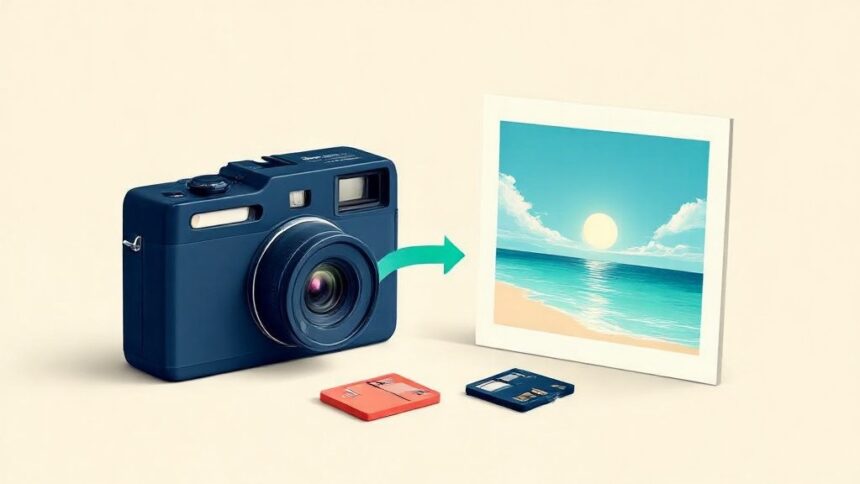
Digital cameras have become our go-to tools for capturing life’s memorable moments. However, accidentally deleting cherished photos from your camera’s memory can be disheartening. The good news is that you can often recover these deleted photos with the right steps and tools.
Photos on Digital Cameras are stored in SD cards. In addition, SD cards are prone to have issues that can lead to data loss and even camera malfunction. In this article, we will guide you through recovering your lost pictures from a Digital Camera.
The sooner you start the recovery process, the better. The longer you wait, the more likely your deleted photos will be overwritten and unrecoverable. Here’s how you can recover your deleted photos from Digital Cameras:
Step 1: Stop Using the SD Card
The first and most crucial step to recovering photos is to stop using the SD card as soon as you realize that photos have been deleted. Continuing to use the card may overwrite the deleted data, making recovery significantly more challenging.
Step 2: Get a Card Reader
If your computer lacks an integrated SD card slot, you will need a card reader to connect the SD card to your computer—card readers are widely available and are typically USB-based for easy connectivity.
Step 3: Use Stellar Photo Recovery Software
Stellar Photo Recovery is a powerful photo recovery software that can be used to recover deleted or lost files from SD cards and other flashes memory devices. It is a useful tool that can recover a wide variety of file types, including photos, videos, music, and more.
Steps to recover photos from Digital Cameras:
- Insert your SanDisk SD card into the card reader and then connect the card reader to your computer. Ensure that your computer before proceeding properly recognizes the card.
- Download and Install the software by following the on-screen instructions.
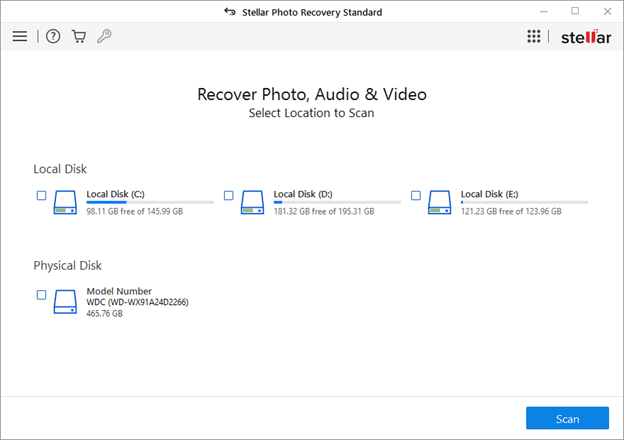
- Select the drive or storage media from which you want to recover deleted photos and click “Scan.” Stellar Photo Recovery will perform a quick scan to identify deleted photos and other media files on the selected storage media. You can sее the progress of the scan as it happens.
- Once the quick scan is complete, the software will display the recoverable photos in a thumbnail or file list format. If you do not find your desired photos, you can opt for ‘Deep Scan’.
- You can now preview the recovered photos to ensure they are the ones you want to recover. You can click on individual photos to see larger previews.
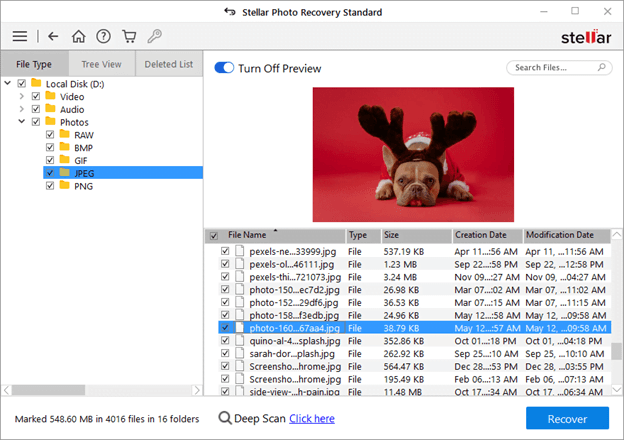
- After selecting the desired photos, click the “Recover” button. A dialog box will appear asking you to choose the destination where you want to save the recovered photos. It is essential to save them to a different drive or location to avoid overwriting data on the original storage media.
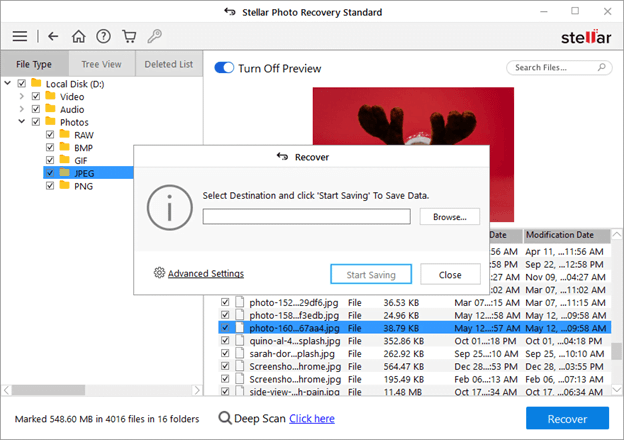
- Once you’ve chosen the destination, click “Start Saving.” Stellar Photo Recovery will then recover and save the selected photos to the specified location.
That’s it! All your deleted photos and videos will be stored in a safe location and you can keep the backup to avoid such mishaps in the future.
Tips to Protect Digital Camera Photos:
You can prevent photo loss from the camera by avoiding certain common practices while handling your digital camera.
- Never use the camera card on multiple devices.
- Always reuse SD cards after formatting.
- Don’t wrongly insert/ еjеct SD cards from devices.
- Avoid recording when the camera card is full.
Conclusion:
Losing photos from your digital camera can be disheartening, but with the right approach, recovery is often possible. Acting swiftly and using specialized photo recovery software is a key to successful photo recovery. Remember that the sooner you stop using the camera and the memory card after deletion, the better your chances of recovering your cherished memories. Whether your camera uses removable memory cards or internal storage, these steps will guide you through the process of recovering your deleted photos and keeping your valuable memories intact.