

We use cookies, including third-party cookies from Google to serve personalized ads through AdSense, to operate this site and understand how it is used. By continuing to browse, you accept this use. See our Privacy Policy and Terms of Use for details, including how to opt out of personalized advertising.
Accept
SmartData CollectiveSmartData Collective
  • Analytics
    AnalyticsShow More: Analytics
    Cut-paper editorial diagram of public web pages flowing through a terracotta volume meter into a BI budget panel.
    The Line Item Behind Public Web Data in BI: Proxy Bandwidth
    12 Min Read
    Flat editorial illustration: The article is about joining public web signals with internal business metrics so BI teams can inter
    Alternative Data in BI: Bringing Public Web Data Into Your Dashboards
    23 Min Read
    Flat editorial illustration: The article is about automating the collection, preparation, and delivery of marketing data across p
    From Data to Dashboards: 5 Marketing Reporting Automation Software Picks
    12 Min Read
    Flat editorial illustration: The article contrasts passive follower totals with a behavioral path from attention and trust to cli
    Creator Analytics Beyond Follower Count: Seven Metrics That Measure Audience Behavior
    11 Min Read
    Flat editorial illustration: The article connects AI and marketing analytics with managerial judgment grounded in consumer behavi
    How an Online MBA in Marketing Connects AI and Data Analytics
    11 Min Read
  • Big Data
  • BI
  • Exclusive
  • IT
  • Marketing
  • Software
Search
© 2008-25 SmartData Collective. All Rights Reserved.
Reading: How to Remove Firefox from Your Mac and Clear Its Stored Data
Share
Notification
Font ResizerAa
SmartData CollectiveSmartData Collective
Font ResizerAa
Search
  • About
  • Help
  • Privacy
Follow US
© 2008-23 SmartData Collective. All Rights Reserved.
SmartData Collective > Big Data > How to Remove Firefox from Your Mac and Clear Its Stored Data
Big DataSoftware

How to Remove Firefox from Your Mac and Clear Its Stored Data

Dragging Firefox to the Trash can leave your saved logins on the Mac.

Albert Smith
Albert Smith
6 Min Read
A Firefox window lifts off a Mac while a folder with bookmarks and saved logins remains.
SHARE

Quit Firefox and move it from Applications to the Trash to uninstall it from your Mac. Your Firefox profile is stored separately. Decide whether to keep the bookmarks, saved logins and history in that profile before removing it.

Contents
  • Uninstall the Firefox app
  • Remove the local Firefox profile
  • When a cleanup tool is useful
  • Clear browsing data while keeping Firefox
  • Handle synced data on the right device
  • Frequently asked questions
    • Does moving Firefox to the Trash delete my bookmarks?
    • Will uninstalling Firefox delete files I downloaded?
    • Can I reinstall Firefox after removing the profile?

To remove Firefox from a Mac, quit the browser and move Firefox from Applications to the Trash. To clear its local profile, back up any data you want to keep and move the Firefox folder at ~/Library/Application Support/Firefox to the Trash separately. To clear history and cookies while keeping Firefox, use Clear Recent History instead.

  • If you already use a macOS uninstaller, review the exact files it selects before clicking remove.
  • For history, cookies or temporary files, open History → Clear Recent History , select a time range and check only the categories you want to remove.
  • Your bookmarks remain in the Firefox profile until you delete that profile or the bookmarks themselves.
  • Check for additional profiles if more than one person has used the same macOS account.

Uninstall the Firefox app

  1. In Firefox, choose Firefox → Quit Firefox.
  2. Open Applications in Finder.
  3. Select Firefox and choose File → Move to Trash.

That removes the application. Firefox keeps its bookmarks, logins, browsing history and other settings in the separate profile, as Mozilla’s uninstall guide explains.
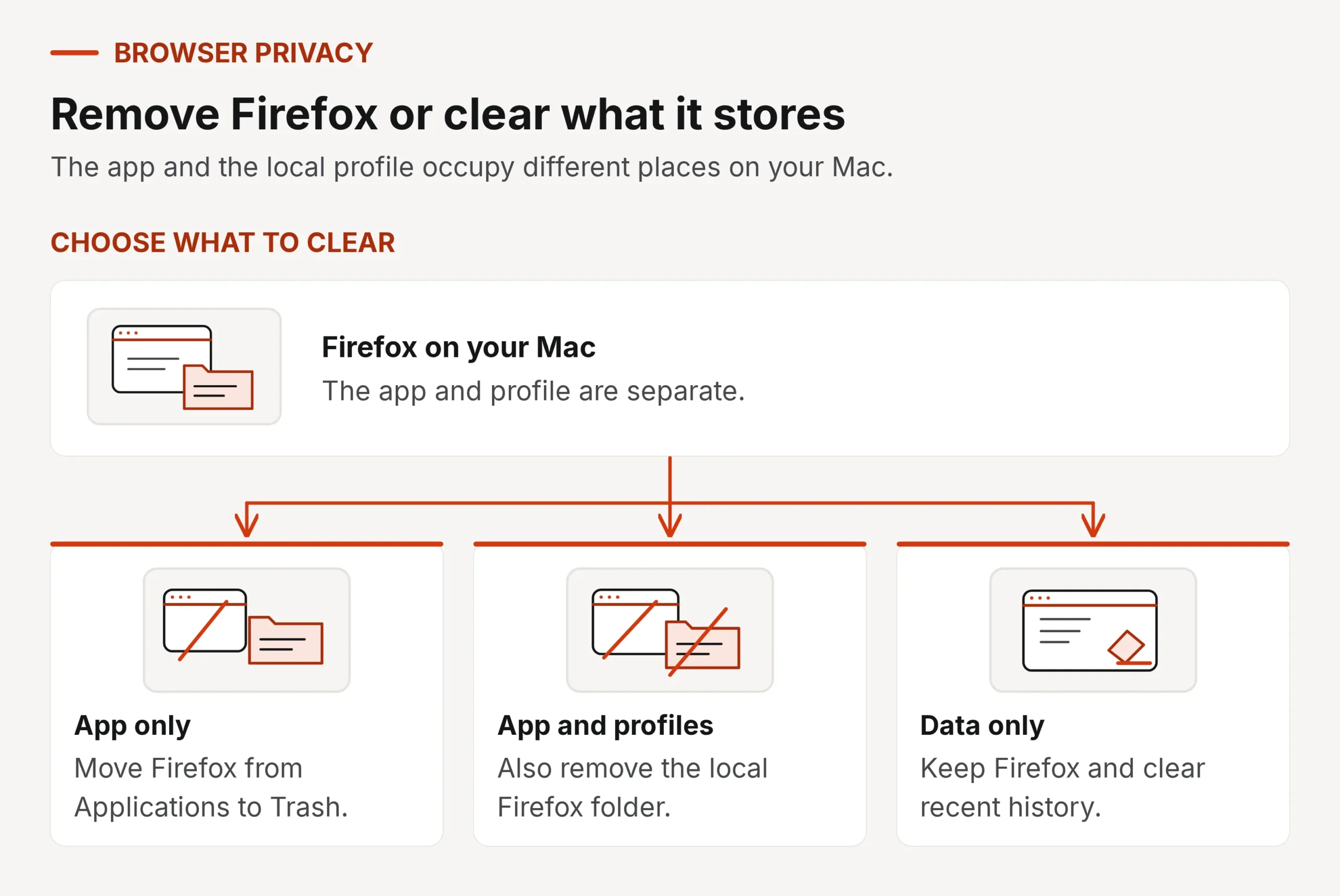
Three cleanup paths distinguish uninstalling Firefox, removing its local profile and clearing browsing data while keeping the browser.
Remove Firefox or clear what it stores
Three cleanup paths distinguish uninstalling Firefox, removing its local profile and clearing browsing data while keeping the browser.

Remove the local Firefox profile

If you plan to reinstall Firefox or move to another browser, locate and back up the profile before removing it. While Firefox is still available, you can open about:support in the address bar and use the button beside Profile Folder to find the active profile. Check for additional profiles if more than one person has used the same macOS account.

  1. With Firefox closed, open Finder → Go → Go to Folder.
  2. Enter ~/Library/Application Support/Firefox. Mozilla puts the profiles inside this folder under Profiles by default.
  3. If you want to remove all Firefox profiles for that Mac user, move that Firefox folder to the Trash. Leave other application support folders alone.
  4. Check that the backup includes anything you still need before you empty the Trash.

A Mac with several macOS accounts can have separate Firefox profiles for each user. The Library path above refers to the currently signed-in Mac user.

More Read

Miss the Right Connections at Your Own Peril
First Look: OpenL Tablets
Big Data Is The Driving Force Behind New Colocation Services
The Future of Trusted Data Management: Striking a Balance between AI and Human Collaboration
Wi-Fi Connectivity Issues Impede Data-Driven Healthcare Models

When a cleanup tool is useful

If you already use a macOS uninstaller, review the exact files it selects before clicking remove. MacPaw’s guide on how to uninstall Firefox on Mac describes its cleanup workflow. A file list is useful if you want to keep profile data for a later reinstall. Confirm that the tool selected Firefox’s files and that anything you want to keep is backed up.

What you wantWhere to do it
Uninstall Firefox and keep your profileMove Firefox from Applications to the Trash.
Remove Firefox and all its local profiles for this Mac userRemove the app and the Firefox folder under your Library’s Application Support folder.
Clear browsing history or site data while keeping FirefoxChoose the relevant categories in Clear Recent History.

Clear browsing data while keeping Firefox

For history, cookies or temporary files, open History → Clear Recent History, select a time range and check only the categories you want to remove. Clearing site cookies can sign you out of sites. To remove saved passwords, open Firefox Password Manager and delete the saved entries there.

Handle synced data on the right device

If you use Firefox Sync and want to keep those records on your other devices, sign out of your Mozilla account on this Mac before clearing local data. If you plan to give the Mac to someone else, review the local profile separately. Mozilla documents how Sync handles local and server copies.

Frequently asked questions

Does moving Firefox to the Trash delete my bookmarks?

Your bookmarks remain in the Firefox profile until you delete that profile or the bookmarks themselves. Back up the profile before removing it if you want to keep your bookmarks or saved logins.

Will uninstalling Firefox delete files I downloaded?

Files you already saved in Downloads or another folder stay there. Clearing the browser’s download history removes the list Firefox displays. Manage the downloaded files separately in Finder.

Can I reinstall Firefox after removing the profile?

You can download Firefox again and start with a clean profile. If you want your old bookmarks or settings back, restore them from the profile backup you made or sign in to Sync if those data types were synced and still exist.


TAGGED:macpasswordspersonal dataprivacy
Share This Article
Facebook Pinterest LinkedIn
Share
ByAlbert Smith
Follow:
Albert Smith is a Digital Marketing Manager with Hidden Brains, a leading IT company specializing in enterprise and emerging technology solutions such as Blockchain development , IoT, Cloud, Chatbot and Big Data. He provides innovative ways to help tech companies, startups and large enterprises build their brand.

Follow us on Facebook

Latest News

Cut-paper editorial scene of labeled data cards passing through a charcoal inspection frame and vermilion quality gates.
How to Measure Data Annotation Quality Before Release
Big Data Exclusive
Cut-paper editorial diagram of service callback tickets moving through a terracotta sorter into rising scorecard bars.
Why Your Redo Jobs Hold the Best Data in Your Franchise
Big Data Data Collection Exclusive
Cut-paper editorial diagram of public web pages flowing through a terracotta volume meter into a BI budget panel.
The Line Item Behind Public Web Data in BI: Proxy Bandwidth
Big Data Business Intelligence Exclusive Web Analytics
Cut-paper editorial diagram of raw business invoices moving through a terracotta data pipeline into structured analytics.
Where Intelligent Automation & Data Pipelines Pay Off First
Artificial Intelligence Big Data

Stay Connected

1.2KFollowersLike
33.7KFollowersFollow
222FollowersPin

You Might also Like

Smart Data
Best PracticesBig DataBusiness IntelligenceData ManagementRisk Management

Why Smart Data is the Key to Future Lending

7 Min Read
Big Data Generation: What Will the Future Look Like for Millennials?
Big DataPrivacy

Big Data Generation: What Will the Future Look Like for Millennials?

6 Min Read
The Next Wave in Recommendation Systems?
AnalyticsExclusivePredictive AnalyticsWeb Analytics

The Next Wave in Recommendation Systems?

4 Min Read
Blimp Flies the Friendly NSA Skies and Your Right to be Forgotten
Commentary

Blimp Flies the Friendly NSA Skies and Your Right to be Forgotten

6 Min Read

SmartData Collective is one of the largest & trusted community covering technical content about Big Data, BI, Cloud, Analytics, Artificial Intelligence, IoT & more.

How To Get An Award Winning Giveaway Bot
Big Data Chatbots Exclusive
From Bolts to Bots: How AI Is Fortifying the Automotive Industry
Artificial Intelligence

Quick Link

  • About
  • Contact
  • Privacy
Follow US
© 2008-26 SmartData Collective. All Rights Reserved.
Welcome Back!

Sign in to your account

Username or Email Address
Password

Lost your password?