
When a SQL Server database will not open and DBCC CHECKDB cannot repair it safely, Stellar Repair for MS SQL offers a last-resort way to scan damaged MDF or NDF files, preview recoverable objects, and export selected data. It is not a substitute for a tested backup, but it can be useful when the built-in repair path risks deleting pages or when no clean restore point is available.
- What Is Stellar Repair for MS SQL?
- Why Would You Need Specialized SQL Recovery Software?
- Key Features of the Software
- How the Recovery Workflow Operates
- Repairing Databases Without SQL Server Installed
- Tiered Editions and Backup Support
- Compatibility and Pricing for Microsoft SQL Server Recovery
- Final Assessment of SQL Database Repair Tools
What Is Stellar Repair for MS SQL?
Stellar Repair for MS SQL is a recovery application from Stellar Data Recovery for database administrators and IT teams. It reads damaged Microsoft SQL Server database files and attempts to reconstruct recoverable content when native tools cannot return the database to service.
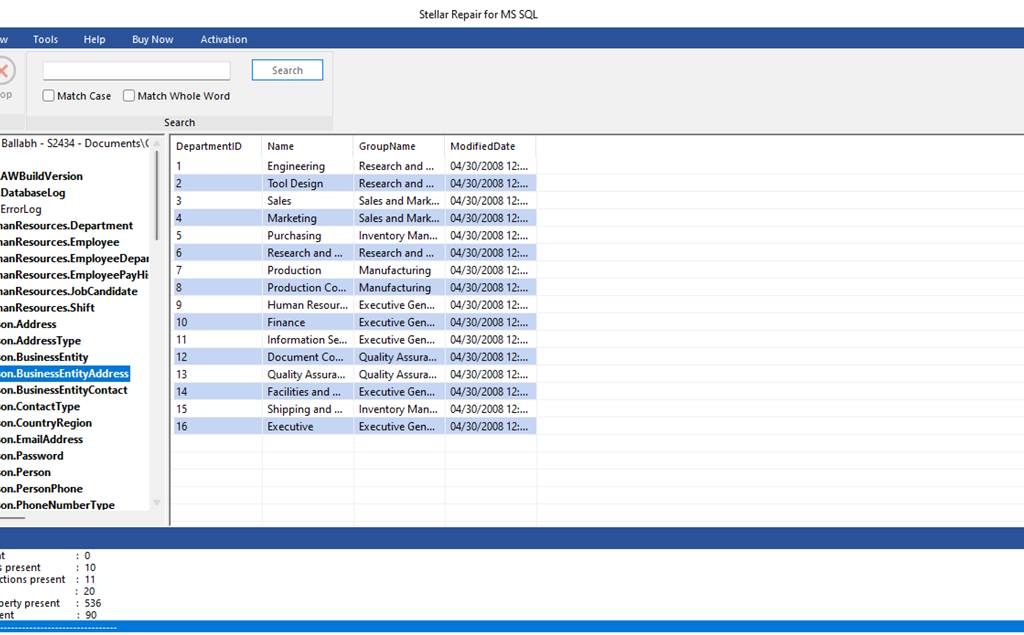
The software scans MDF and NDF files for database objects. That can include tables and indexes, while stored procedures, triggers, and keys appear separately in the recovery view. Administrators can inspect the results before saving anything, which matters when only a few business-critical tables are needed.
Rather than asking a team to rebuild a schema by hand, the application analyzes the damaged file itself. That is most relevant after a failed storage write, a corrupt file header, or a database that remains in a SUSPECT or RECOVERY_PENDING state after an abrupt reboot.
More Read

Why Would You Need Specialized SQL Recovery Software?
SQL Server databases can become corrupt after I/O errors, controller faults, or interrupted writes. DBCC CHECKDB can identify consistency problems, but its most aggressive repair option may remove damaged data pages to restore structural consistency.
Restoring a known-good backup should remain the first choice. Still, recovery pressure is real: 50% of data center operators reported at least one impactful outage during the previous three years in Uptime Institute’s 2025 survey. When the latest backup is incomplete or a repair command would discard records, a separate recovery tool can help a team assess what remains before making an irreversible choice.
Key Features of the Software
- MDF and NDF repair: The core engine processes both primary MDF files and secondary NDF files.
- Object-level recovery: The software can recover individual objects instead of limiting the result to raw rows.
- Granular preview: Administrators can inspect tables and other objects in the interface before saving recovered data.
- Deleted-record recovery: An option is available to locate records previously deleted from tables.
- Advanced Scan: When a standard scan cannot read enough of the file structure, Advanced Scan performs a deeper pass.
- Flexible export: Recovered data can be saved to a live SQL Server instance, a new database, or formats such as CSV, HTML, and XLS.
- Parallel processing: The application can use multiple processor cores. Recovery speed will still depend heavily on storage throughput and the extent of corruption.
How the Recovery Workflow Operates
The workflow follows four clear stages:
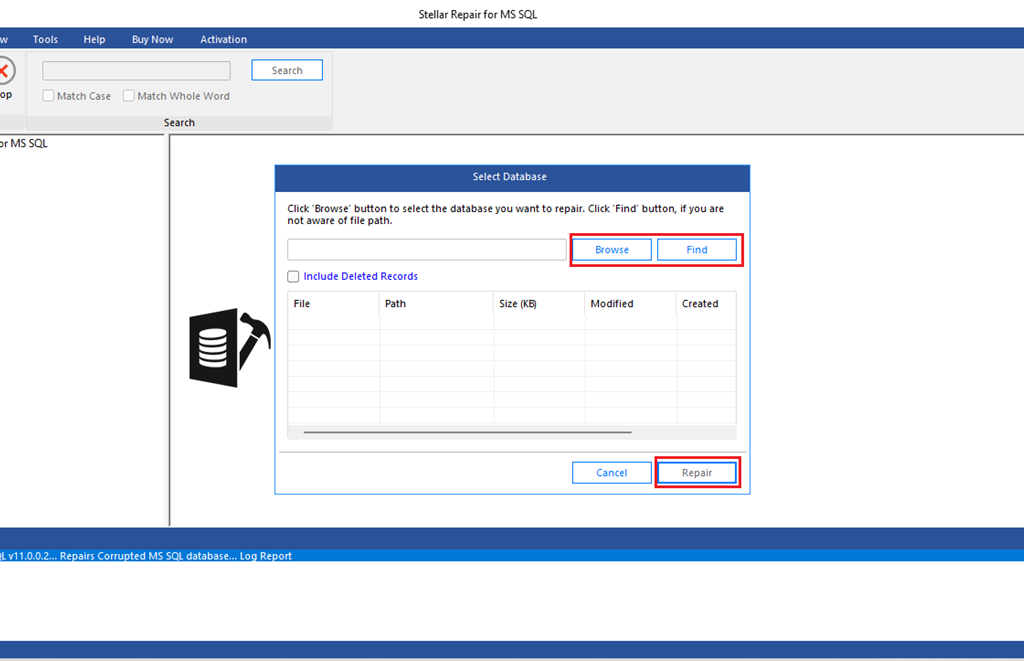
- Selection: Choose the damaged MDF or NDF file.
- Scanning: Run a standard scan first, then use Advanced Scan if the first pass cannot identify the required objects.
- Preview: Review recoverable content in the tree-style interface.
- Exporting: Save verified data to a live environment, a new database, or an external file format.
Repairing Databases Without SQL Server Installed
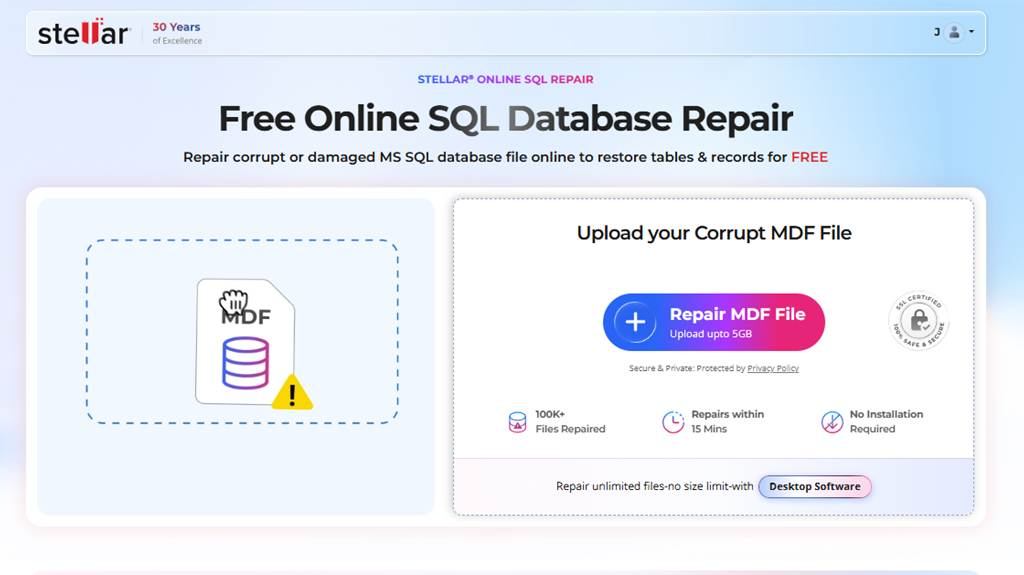
When a local SQL Server environment is unavailable, Stellar also provides an online repair option for an initial assessment. A user can upload an MDF file through a browser and check whether recoverable content is present before setting up local recovery infrastructure.
Stellar’s online SQL repair service supports MDF files up to 500 MB as of August 2026. That makes it better suited to a small database or a diagnostic sample than to a large production file, especially when the file contains sensitive customer, financial, or health data.
Tiered Editions and Backup Support
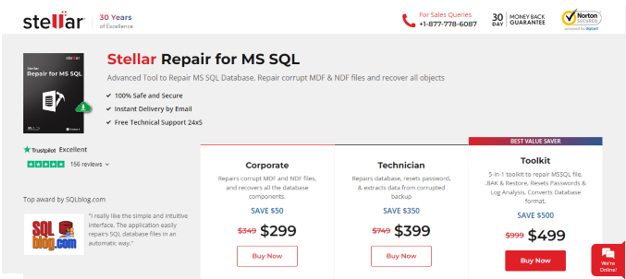
Stellar separates its functions by edition. The Corporate edition focuses on database-file repair, while Technician and Toolkit add options for more difficult recovery cases.
Technician users can process corrupt backup files with the .BAK extension, which matters when both the active database and its backup are damaged. The Toolkit edition adds transaction-log analysis and database conversion, giving teams more options when they need to inspect activity or move recovered data into another format.
Compatibility and Pricing for Microsoft SQL Server Recovery
As of August 2026, Stellar states that the product supports databases created in SQL Server 2025, SQL Server 2022, SQL Server 2019, and earlier releases. The product is available for Windows and Linux environments, which can help organizations supporting older database estates alongside newer systems.
| Edition | Annual Price | Primary Focus |
|---|---|---|
| Corporate | $299 | MDF/NDF Repair |
| Technician | $399 | BAK Recovery |
| Toolkit | $499 | Logs & Conversion |
Stellar listed annual prices of $299 for Corporate, $399 for Technician, and $499 for Toolkit as of August 2026. Prices and promotional discounts can change, so your procurement team should confirm the current license terms before purchase.
The free trial lets administrators scan a file and preview recoverable data before they buy. The trial cannot prove that every record will be restored, but it can show whether the specific tables and objects your team needs are visible before you commit to a license.
Final Assessment of SQL Database Repair Tools
For a badly damaged SQL database, specialized repair software can be a sensible final option after backup recovery has been ruled out. Data restoration from a verified backup remains safer because it preserves a known-good state, but Stellar Repair for MS SQL can help recover selected components when that path is unavailable.
Choose the edition based on the failure you actually face: an MDF or NDF problem may only need Corporate, while a corrupt .BAK file points to Technician and log analysis points to Toolkit. Run the trial against a copy of the damaged file, document the objects it finds, and keep production-sensitive files out of third-party services unless your security policy permits that transfer. Your next priority should be testing restores in SQL Server Management Studio, because a recovery tool is most valuable when it is the exception, not the recovery plan.