Python is a high-level, object-oriented development tool. Here is a quick, hands-on tutorial on how to use the text analytics function.
Python enables four kinds of analytics:
- Text matching
- Text classification
- Topic modelling
- Summarization
Let’s begin by understanding some of the NLP features of Python, how it is set up and how to read the file used for:
Basics of NLP
Reading a text file
- Tokenisation
- Stemming & Lemmatization
- Dispersion Plots
- Word frequency
Setting up NLTK
- import nltk
- from nltk.book import*
- nltk.download()
Reading a text file
import os
os.chdir(‘F:/Work/Philip Adams/Course Content/Data’)
f=open(‘Genesis.txt’).read().decode(‘utf8’)
- Our programs will often need to deal with different languages, and different character sets. The concept of “plain text” is a fiction.
- ASCII
- Unicode is used to process non-ASCII charcters
- Unicode supports over a million characters. Each character is assigned a number, called a code point.
- Translation into unicode is called decoding.
Let’s move a step deeper and understand the four basics of NLP in detail:
Tokenisation
- Breaking up the text into words and punctuations
- Each distinct word and punctuation
line=’Because he was so small, Stuart was often hard to find around the house. – E.B. White’
tokens=Because, he, was, so, small, Stuart, was, often, hard, to, find, around, the, house,’,’, E, B, White, ‘.‘, ‘-’
tokens=nltk.word_tokenize(f)
len(tokens)
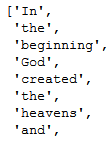
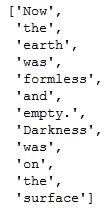
tokens[:10]
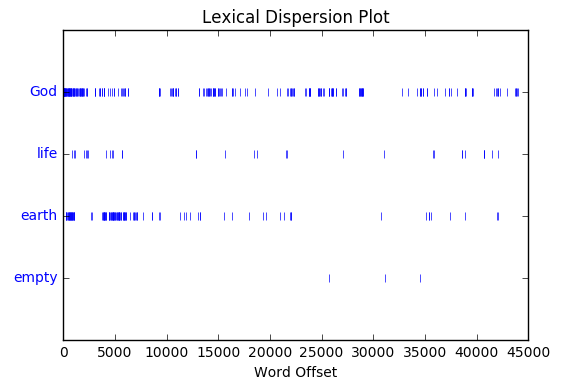
Dispersion plots
Shows the position of a word across the document/text corpora
text.dispersion_plot([‘God’,’life’,’earth’,’empty’])
Converting tokens to NLTK text
To apply NLTK processes, tokens need to be converted to NLTK test
text=nltk.Text(tokens)
Collocations
Words frequently occurring together
text.collocations()
one hundred; years old; Paddan Aram; young lady; seven years; little ones; found favor; burnt offering; living creature; every animal; four hundred; every living; thirty years; Yahweh God; n’t know; nine hundred; savory food; taken away; God said; ‘You shall
Word at a particular position
text[225]
Position of a particular word
text.index(‘life’)
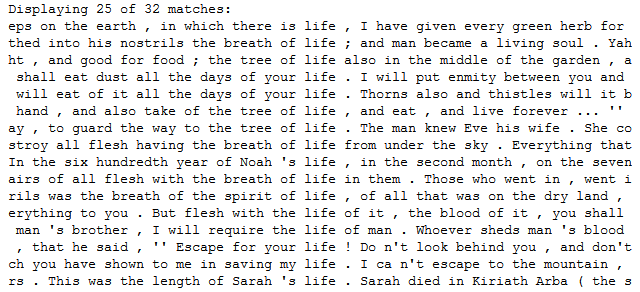
Concordance
Finding the context of a particular word in the document
text.concordance(‘life’)
- Total number of words in a document
len(tokens)
- Total number of distinct words in a document
len(set(tokens))
- Diversity of words or percent of distinct words in the document
len(set(tokens))/len(tokens)
Percentage of text occupied by one word
100*text.count(‘life’)/len(tokens)
- Frequency distribution of words in a document
from nltk.probability import FreqDist
fdist=FreqDist(tokens)
- Function to return the frequency of a particular
def freq_calc(word,tokens):
from nltk.probability import FreqDist
fdist=FreqDist(tokens)
return fdist[word]
- Most frequent words
fdist.most_common(50)
- Other frequency distribution functions
fdist.max(), fdist.plot(), fdist.tabulate()
- Counting the word length for all the words
([len(w) for w in text])
- Frequency distribution of word lengths
fdistn=FreqDist([len(w) for w in text])
Fdistn
- Returning words longer than 10 letters
[w for w in tokens if len(w)>10]
- Stop words
Words which are commonly used as end points of sentences and carry less contextual meaning
from nltk.corpus import stopwords
stop_words=set(stopwords.words(‘english’))
- Filtering stop words
filtered=[w for w in tokens if not w in stop_words ]
filtered
- Stemming
Keeping only the root/stem of the word and reducing all the derivatives to their root words
For e.g. ‘walker’, ‘walked’, ‘walking’ would return only the root word ‘walk’
from nltk.stem import PorterStemmer
ps=PorterStemmer()
for w in tokens:
print ps.stem(w)
Lemmatization
Similar to stemming but more robust as it can distinguish between words based on Parts of Speech and context
For e.g. ‘walker’, ‘walked’, ‘walking’ would return only the root word ‘walk’
from nltk.stem import WordNetLemmatizer
lm=WordNetLemmatizer()
for w in tokens:
print lm.lemmatize(w)
lm.lemmatize(‘wolves’)
Result: u’wolf
lm.lemmatize(‘are’,pos=’v’)
Result: u’be
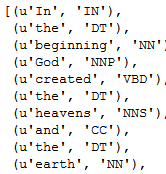
- POS (Part of Speech) Tagging
Tagging each token/word as a part of speech
nltk.pos_tag(tokens)
Regular
- Regular Expressions
Expressions to denote patterns which match words/phrase/sentences in a text/document
- re.search
matchObject = re.search(pattern, input_str, flags=0)
Stops after first match
import re
regex=r”(\d+)”
match=re.search(regex,”91,’Alexander’,’Abc123′”)
match.group(0)
Result: 91
re.findall
matchObject = re.findall(pattern, input_str, flags=0)
Stops after first match
import re
regex=r”(\d+)”
match=re.findall(regex,”91,’Alexander’,’Abc123′”)
match.group(0)
Result: 91, 123
re.sub
replacedString = re.sub(pattern, replacement_pattern, input_str, count, flags=0)
import re
regex=r”(\d+)”
re.sub(regex,”,”91,’Alexander’,’Abc123′”)
Result: “,’Alexander’,’Abc'”
Text Cleaning
Removing a list of words from the text
noise_list = [“is”, “a”, “this”, “…”]
def remove_noise(input_text):
words = input_text.split()
noise_free_words = [word for word in words if word not in noise_list]
noise_free_text = ” “.join(noise_free_words)
return noise_free_text
remove_noise(“this is a sample text”)
Replacing a set of words with standard terms
input_text=”This rt is actually an awsm dm which I luv”
words = input_text.split()
new_words = []
for word in words:
if word.lower() in lookup_dict.keys():
word = lookup_dict[word.lower()]
new_words.append(word)
new_words
new_text=” “.join(new_words)
new_text
N-Grams
N-grams is a sequence of words n items long.
def generate_ngrams(text, n):
words = text.split()
output = []
for i in range(len(words)-n+1):
output.append(words[i:i+n])
return output
generate_ngrams(“Virat may break all the records of Sachin”,3)
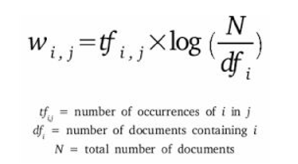
TF-IDF
Term Frequency – Inverse Document Frequency
convert the text documents into vector models on the basis of occurrence of words in the documents
| Term | Definition |
| Term Frequency (TF) | Frequency of a term in document D |
| Inverse Document Frequency (IDF) | logarithm of ratio of total documents available in the corpus and number of documents containing the term T |
| TF-IDF | TF IDF formula gives the relative importance of a term in a corpus (list of documents) |
TF-IDF
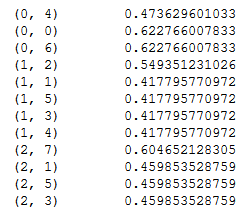
from sklearn.feature_extraction.text import TfidfVectorizer
obj = TfidfVectorizer()
corpus = [‘Ram ate a mango.’, ‘mango is my favorite fruit.’, ‘Sachin is my favorite’]
X = obj.fit_transform(corpus)
print X
Other tasks
Text Classification
- Naïve Bayes Classifier
- SVM
Text Matching
- Levenheisten distance – minimum number of edits needed to transform one string into the other
- Phonetic matching – A Phonetic matching algorithm takes a keyword as input (person’s name, location name etc) and produces a character string that identifies a set of words that are (roughly) phonetically similar
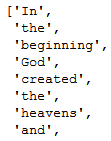
Different ways of reading a text file
f=open(‘genesis.txt’)
words= f.read().split()
f.close()
f=open(‘genesis.txt’)
words=[]
for line in f:
print line.split()
f.close


Different ways of reading a text file
f=open(‘genesis.txt’)
words=f.readline().split()
f.close()
words=f.readline().split()
f.close()