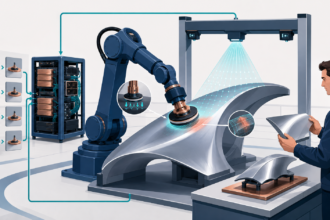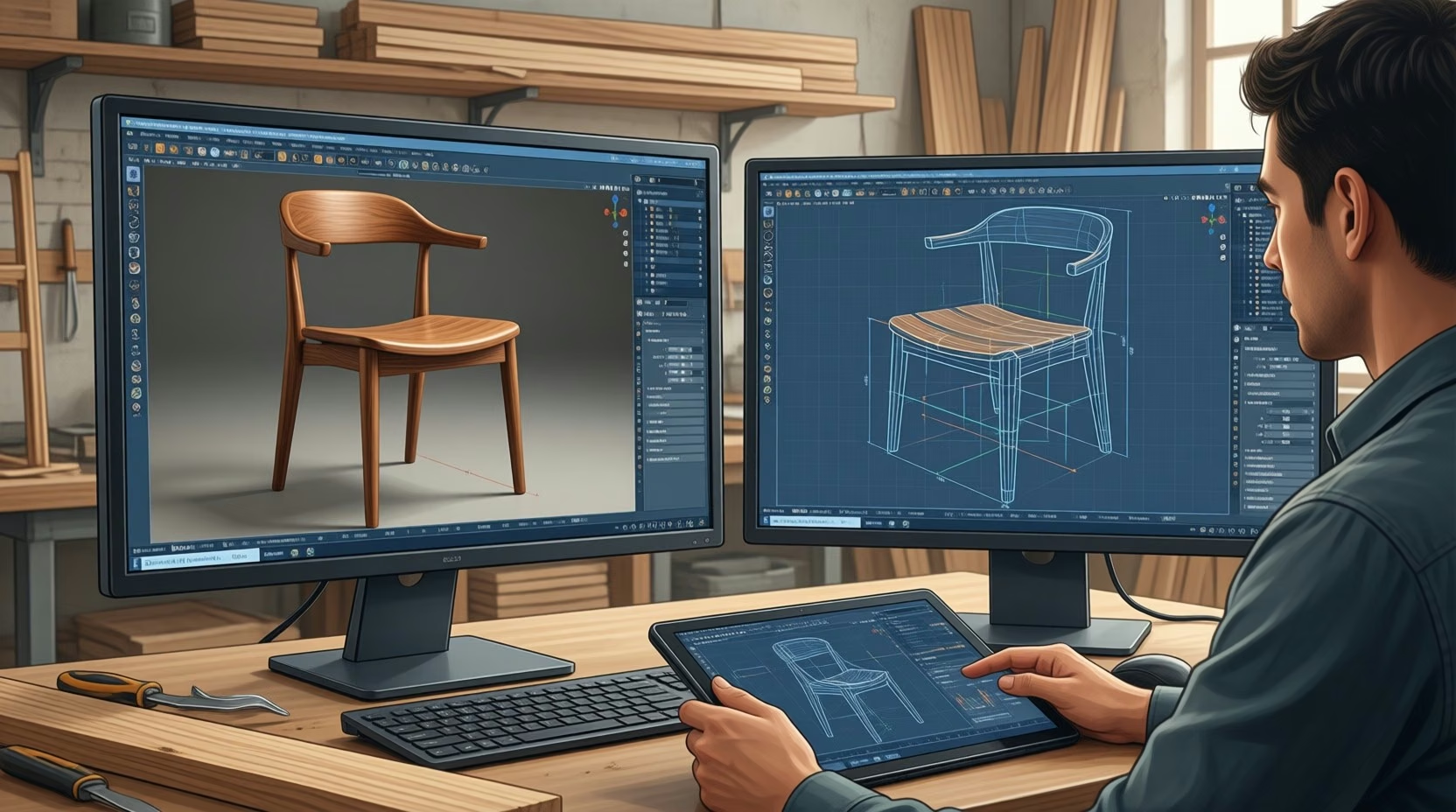
AI furniture design can produce a convincing chair image without producing a chair your workshop can build. Engineering teams need editable geometry, structural checks, and manufacturing instructions. The five legacy applications reviewed here serve different parts of that workflow, while newer generators expand the options for early concepts and engineering exploration.
- Engineering-grade AI versus furniture visualization
- What AI furniture engineering software can do: virtual prototypes, production planning, and defect detection
- Five furniture engineering design applications from the original 2023 roundup
- SolidWorks vs AI furniture design software cost comparison
- Generative furniture design options to evaluate
- How is AI changing the furniture design industry?
- Validate geometry and cutting plans before manufacturing
- Match AI support to manufacturing decisions
- Connect approved furniture designs to PLM and ERP
- FAQ
- Is there an AI tool that can design furniture?
- What is generative AI for furniture design?
- Are AI-driven furniture design tools costly?
- Can AI replace human furniture designers?
- Does a furniture rendering mean the design is ready to build?
- What should a workshop check before releasing an AI-generated chair design?
- Release the approved furniture revision to the workshop
AI furniture design tools split into image generators that show how a piece looks and engineering software that supplies editable geometry, structural checks, and manufacturing instructions. A workshop should approve the engineering model, not the rendering, before release. The five legacy applications reviewed here serve different parts of that workflow, and newer generators add options for early concepts.
- Keep customer approval of a rendering separate from engineering approval of a frame, because they are different decisions.
- Assess parametric modeling, simulation, and manufacturing output separately; a product’s AI label does not establish any of them.
- Check dimensions, connections, structural requirements, and the intended cutting process before release to production.
A customer approving a rendering and an engineer approving a frame are making different decisions. Keep those approvals separate. A furniture design generator can help your team explore an appearance, but the production decision still depends on dimensions, materials, connections, and the process used to make the parts.
Furniture trend coverage for 2026 emphasizes AI alongside customization, sustainable materials, and modular designs. Those themes appear in reporting from CIFF, Accio, and Salsita. They make the engineering handoff more consequential: each customer variation needs a corresponding design that your workshop can actually produce. The broader design discussion also appears in Patrick van Hoof’s article, without relying on its old market forecasts.
Engineering-grade AI versus furniture visualization
AI generative design software for furniture engineering must support decisions about physical parts, loads, and production. Image generation supports appearance decisions. For your engineering team, the deciding parameter is the output: editable geometry and validated manufacturing instructions carry a design further than a photorealistic furniture image.
Generative AI design vs parametric CAD furniture engineering is a workflow distinction. Parametric modeling lets you revise dimensions and related components. Engineering generation explores alternatives against constraints, while structural simulation helps evaluate a candidate. Design for manufacturing (DFM) checks whether the chosen shape suits the intended process.
When an AI furniture design generator produces non-manufacturable geometry, return the concept to engineering review before preparing machine instructions. Check scale and connections, including any unsupported cantilever. Treat the image as a reference while you establish the actual part geometry. CNC toolpaths and sheet nesting belong to subsequent production steps.
What AI furniture engineering software can do: virtual prototypes, production planning, and defect detection
Furniture engineering teams can use AI for virtual prototypes, production planning, and defect detection, with different tools handling each task. The useful boundary is manufacturing readiness: a concept can move forward only when its geometry, material requirements, and production instructions agree with the furniture your team intends to build.
A wider cabinet should trigger a review of its parts and assembly, not just a wider preview image. Keep the dimensions that drive the model available to the engineer who reviews the change. Your wood furniture design plans should identify what will be cut and how those parts will fit together.
More Read

Parametric modeling, simulation, and manufacturing output are separate capabilities. Assess each directly when selecting software. A product’s AI label does not establish that it can analyze a loaded chair frame or supply instructions for your CNC machine.
Five furniture engineering design applications from the original 2023 roundup
The original five applications cover engineering CAD, woodworking, cabinet design, customer presentations, and diagramming. This dated archive preserves their different uses without treating every product as an AI-native engineering platform. Choose the relevant workflow first, then check the current edition’s outputs and manufacturing support before committing a production job.
1. SolidWorks
SolidWorks belongs in the engineering CAD part of a furniture workflow, where your team works with 3D models and evaluates design changes. Use its modeling and simulation capabilities to investigate a design before fabrication. The original roundup’s claims about lower prices and automatic machine-learning safety checks are not a basis for selecting a current edition. Dassault Systèmes has announced general availability of SOLIDWORKS 2026, which it describes as including generative AI for drawing creation and detailing and for assembly creation. The announcement does not mention furniture, so test those features on your own parts.
For a customizable frame, review the changed geometry and the assumptions behind its analysis together. A simulation result needs an engineering check against the intended material, connections, and loading. Include DFM review before releasing the model to production.
2. SketchList 3D
SketchList 3D addresses woodworking and furniture planning, including tables, chairs, closets, and benches. Evaluate its modeling workflow and reusable designs against the pieces your shop builds. The original article described trial access and stock-cost information, but did not establish an AI generation capability. Check current trial terms before arranging a team evaluation. The vendor’s site currently offers a 14-day free trial and paid subscription plans (checked October 3, 2026).
3. Polyboard
Polyboard focuses on cupboards, cabinets, and fittings, with 2D and 3D presentations and output for CNC workflows. That makes the production handoff a useful evaluation target. Test whether a cabinet change produces the expected updated parts and suitable machine output in the configuration you intend to use.
Its design libraries, hardware choices, and assembly methods support customization. The vendor lists PolyBoard 8 in Light, Standard, Professional, and Post_Processor editions and states that the post-processor export is compatible with most CNC machines. Review those settings against your workshop’s actual construction methods, particularly when adapting a library design to a different fitting or cabinet size. Library-based automation should not be described as generative AI without evidence of that capability.
4. Pro100
Pro100 supports cabinet makers, garage cabinet designers, and kitchen dealers who need to share proposed designs with customers. The original feature description includes image exports, panoramic views, metric units, and customization of components and materials. Use those presentation outputs for customer review, with a separate check of the engineering information needed for fabrication. The vendor’s Version 7 announcement lists 3D import (3DS, OBJ, and DAE), a commenting system, texture editing, and improved Kray rendering, and positions the software for cabinet shops, closet companies, remodelers, and millwork manufacturers.
5. Smart Draw
SmartDraw provides diagrams, charts, templates, flowcharts, and mind maps. Your team can use it to document a furniture project or explain a process. Those capabilities do not establish structural simulation or manufacturing-ready furniture geometry, so keep engineering CAD and machine preparation outside its role in this archive. The vendor’s release notes list SmartDraw AI, which creates a visual from a natural-language description; that supports documentation, not structural analysis.
SolidWorks vs AI furniture design software cost comparison
Compare software cost against the deliverable your team needs: a concept image, an editable model, or production output. A free generator can support early exploration while leaving engineering work unfinished. The comparison below separates those roles, lists only features that vendors state on their own pages, and leaves out current prices where a page does not list them.
| Option | Output and role | AI function | Manufacturing handoff | Cost access |
|---|---|---|---|---|
| SolidWorks | Engineering 3D modeling and simulation | Vendor describes generative AI for drawing and assembly creation in SOLIDWORKS 2026; furniture use not established | Engineering and DFM review before release | Current price not established |
| SketchList 3D | Woodworking and furniture planning: tables, chairs, closets, benches | No AI generation capability established | Not established here | Vendor site offers a 14-day trial and paid plans |
| Polyboard | Cabinet designs with 2D and 3D presentations | Library and assembly automation; AI status not established | Vendor states post-processor export is compatible with most CNC machines | Current price not established |
| Pro100 | Cabinet and kitchen presentations, images, panoramas | No specific current AI feature established here | Fabrication output not established here | Current price not established |
| Smart Draw | Diagrams, charts, templates, flowcharts, mind maps | SmartDraw AI creates a visual from a natural-language description; no structural or geometry function | None; documents a project or process | Current price not established here |
| phygital.plus | Generated furniture designs in a browser | AI furniture generation | Engineering geometry and CNC export not established | Advertised as free |
| Autodesk generative design | Engineering design alternatives; historical furniture examples | Generative exploration and optimization | Depends on the chosen design and manufacturing process | Current access and price not established |
Include the work after generation in your cost comparison. During evaluation, have an engineer take a representative concept through the required model revisions and production checks. Record where manual rebuilding is necessary. A low entry price tells you little about the effort needed to release the finished design.
Generative furniture design options to evaluate
phygital.plus offers browser-based AI furniture generation, while Autodesk’s generative design examples address engineering exploration. Your team should evaluate them for different jobs. Use the former to investigate concepts and examine the latter’s engineering workflow, without assuming that either automatically delivers approved furniture geometry and machine instructions.
The phygital.plus furniture generator advertises free generation of chairs, tables, sofas, and cabinets for designers and brands. That gives your team a way to explore furniture design ideas in a browser. Its stated offer does not establish editable CAD solids, structural checks, or CNC-ready exports.
Autodesk generative design belongs in a separate engineering evaluation. Examine how a candidate design is generated, checked, and prepared for its intended manufacturing process. Toolworthy’s furniture AI category and Shapr3D’s furniture software comparison can help with product discovery, but directories and comparison articles are not additional design applications.
Autodesk’s Elbo Chair and a separate lightweight seat-frame example
A furniture design retrospective from mebl identifies the 2016 Elbo Chair by Autodesk designers Arthur Harsuvanakit and Brittany Preston as an early example of AI collaboration with furniture designers. It provides a historical furniture reference, not evidence that an image generator can supply a production-ready chair.
What we learned from this project is that there is a new design space fueled by generative software. Today’s designer is required to create forms informed by their intuition for how the design will perform under load cases.
Arthur Harsuvanakit, then Technical Assistant to the CEO, Autodesk, in SolidSmack, 2016The same mebl retrospective separately describes a seat frame made through generative design, lattice optimization, and investment casting that weighed 56% less than typical models. Its accompanying Airbus A380 projections concern aircraft seating. That weight figure should not be attached to the Elbo Chair or presented as an expected result for a wooden furniture design.
How is AI changing the furniture design industry?
AI can help furniture teams create virtual prototypes, allocate production resources, and detect defects. Customization and modular designs add pressure to keep those activities connected. Your team’s constraint is the handoff between a proposed variation and the engineering and production information that must change when the customer approves it.
Image-based visualization helps customers examine an appearance before purchase. Manufacturing optimization addresses different questions, such as how to cut parts and use material efficiently. Rural Handmade describes AI-generated CNC toolpaths from 3D furniture models. The input is a model, so a room rendering still leaves an engineering step to complete.
Validate geometry and cutting plans before manufacturing
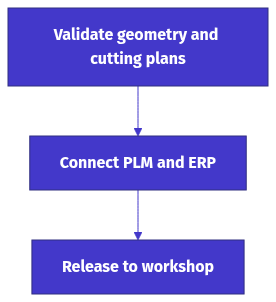
Check generated furniture against dimensions, connections, structural requirements, and the intended cutting process before release. Virtual prototypes and defect detection can support the review, while nesting addresses material use. Your team should approve the geometry before optimizing toolpaths, since a more efficient cutting plan cannot correct an unsuitable part.
If a chair concept includes a long cantilever or an unclear joint, have the engineer resolve it in the model and check the intended loading. Confirm units and scale before preparing machine output. Review toolpaths against the approved geometry, then inspect a physical prototype before committing the full production run.
Plyneer’s manufacturing discussion explains how nesting systems evaluate cutting layouts before work begins. An 8 × 4 plywood sheet has a fixed area, and poorly arranged parts can leave large unusable offcuts. Compare layouts using the actual parts and stock specified for the job; do not apply a generic waste-saving percentage to your workshop.
Match AI support to manufacturing decisions
AI offers furniture manufacturers useful support across design exploration, virtual prototypes, and production decisions. Its value depends on the work your team can carry into manufacturing. For customized or modular furniture, connect each approved variation to its engineering model and material requirements before treating it as a producible order.
Sustainable-material choices and better sheet utilization address different production decisions. Keep both visible when reviewing a design. A furniture concept can call for a preferred material while still needing changes to improve its cutting layout or make its parts easier to assemble.
Connect approved furniture designs to PLM and ERP
Use the approved design revision to connect product lifecycle management (PLM), enterprise resource planning (ERP), and manufacturing preparation. For customized furniture, keep the order configuration aligned with the model and material requirements. The practical checkpoint is whether production receives the exact version that engineering reviewed and the customer approved.
These are handoff requirements, not claims that every application in the archive has a native PLM or ERP connector. Before releasing a changed cabinet, compare the order’s dimensions and materials with the engineering revision. Carry that revision into the parts list and the CNC preparation records so the workshop does not cut an earlier version.
Praxie’s furniture manufacturing discussion describes virtual prototypes, resource allocation, defect detection, and demand forecasting as AI applications. Connect those activities through consistent part and order records. If a prototype review changes a component, update the production records before using them to allocate material or schedule the job.
FAQ
AI tools can generate furniture concepts, and engineering generative design can help explore physical designs. The output determines where a tool fits in your workflow. For your team, browser access or a free offer should remain separate from the question of whether the result supports engineering review and manufacturing.
Is there an AI tool that can design furniture?
phygital.plus advertises a free browser-based generator for chairs, tables, sofas, and cabinets. Autodesk’s generative design work includes historical furniture examples such as the Elbo Chair. Check the deliverable carefully: generated concepts still need engineering review, and the phygital.plus description does not establish CAD geometry or CNC output.
What is generative AI for furniture design?
Two different things share the name. Engineering generation explores design alternatives against constraints, and structural simulation helps evaluate a candidate. Image generators, such as the phygital.plus tool that creates furniture concepts from text prompts or reference photos, support appearance decisions instead.
Are AI-driven furniture design tools costly?
It depends on the deliverable. A free browser generator such as phygital.plus can support early exploration but leaves engineering work unfinished, and a low entry price says little about the effort needed to release a finished design. SketchList 3D offers a 14-day free trial; this article does not list current prices for the other legacy applications.
Can AI replace human furniture designers?
Not on the evidence in this article. A customer approving a rendering and an engineer approving a frame are making different decisions, and a concept that produces non-manufacturable geometry goes back to engineering review. Record where manual rebuilding is necessary when you evaluate a tool.
Does a furniture rendering mean the design is ready to build?
No. A rendering supports an appearance decision. A producible design needs editable geometry, structural checks, and manufacturing instructions that agree with the dimensions, materials, and connections of the parts.
What should a workshop check before releasing an AI-generated chair design?
Check dimensions, connections, structural requirements, and the intended cutting process. Have an engineer resolve any long cantilever or unclear joint in the model, confirm units and scale, review toolpaths against the approved geometry, and inspect a physical prototype before committing the full production run.
Release the approved furniture revision to the workshop
Release furniture to production only after the approved geometry, material requirements, and cutting instructions agree. Across the five archived applications and the generative options discussed here, assign each tool a specific deliverable. Your team should be able to trace the customer’s approved variation through engineering review to the manufacturing records.
A changed cabinet width must reach the files the workshop uses. Before cutting, compare the order dimensions with the approved model revision and confirm that the parts list and CNC preparation use that same revision. Keep the customer rendering alongside those records, but make the engineering model the reference for fabrication. If the image and model disagree, resolve the difference before releasing material. Inspect the prototype against the approved dimensions and connections before authorizing the remaining units.