

Cookies help us display personalized product recommendations and ensure you have great shopping experience.

By using this site, you agree to the Privacy Policy and Terms of Use.
Accept
SmartData CollectiveSmartData Collective
  • Analytics
    AnalyticsShow More
    cybersecurity efforts
    How Behavioral Analytics and AI Are Redefining Cybersecurity for Boca Raton Businesses
    14 Min Read
    data driven risk management in heatlhcare
    How Data Analytics Is Changing Healthcare Risk Management
    17 Min Read
    big data and customer service outsourcing
    How Data Analytics Improves Customer Service Outsourcing
    18 Min Read
    How a Specialized Marketing VA Improves Campaign Analytics
    How a Specialized Marketing VA Improves Campaign Analytics
    11 Min Read
    New Data Analytics Breakthroughs Give eCommerce Startups a Fighting Chance
    New Data Analytics Breakthroughs Give eCommerce Startups a Fighting Chance
    6 Min Read
  • Big Data
  • BI
  • Exclusive
  • IT
  • Marketing
  • Software
Search
© 2008-25 SmartData Collective. All Rights Reserved.
Reading: Add Branded and Non-Branded Keywords separately in Google Analytics Dashboard
Share
Notification
Font ResizerAa
SmartData CollectiveSmartData Collective
Font ResizerAa
Search
  • About
  • Help
  • Privacy
Follow US
© 2008-23 SmartData Collective. All Rights Reserved.
SmartData Collective > Business Intelligence > Market Research > Add Branded and Non-Branded Keywords separately in Google Analytics Dashboard
AnalyticsMarket ResearchMarketing

Add Branded and Non-Branded Keywords separately in Google Analytics Dashboard

gunjan
gunjan
4 Min Read
SHARE
In the new interface of Google Analytics, my favorite feature is multiple dashboards option.
In the new interface of Google Analytics, my favorite feature is multiple dashboards option. You can design the dashboards based on needs of different departments of your company.
 
The main interest of online marketing team is in keywords which are bringing traffic to the website.  The keywords list can help them in measuring their SEO efforts. Sometimes when we select the top 10 or 20 keywords and try to show in the regular reports, the branded keywords tops the list.

What do you mean by branded keywords?

Branded keywords are the keywords which have brand name in the keyphrase.  They are brand name, domain name, product names, misspellings of brand or product or different variations of these names.

Why we need to study branded and non-branded keywords separately?

The branded and non-branded keywords help us in identifying the stage of visitor as per REAN framework.


According to Wikipedia,

REAN is a marketing acronym that was first coined by Xavier Blanc in 2006 while working for a Finnish digital marketing agency. It is a simple yet powerful framework to plan ahead and/or analyze the often complex sequence of inter-related, multichannel; marketing activities that are needed to build & nurture a customer relationship. It stands for:
§  R – Reach: the set of activities needed to raise prospects’ attention for your brand, product or service
§  E – Engage: the gradual, typically multi-channel, often recursive set of activities needed to engage the prospects you just won
§  A – Activate: the activities needed for your prospects to take, eventually, the actions you wanted them to take
§  N – Nurture: the activities needed to nurture the customer relationship you just managed to create
 
Branded keywords tell us that the visitor is already aware of the brand and need to be moved to “ACTIVATED” stage.

Whereas non-branded keywords tell us that the visitor is in “REACH” stage and need to be engaged with the brand.

How to create widgets for branded and non-branded keywords in Google Analytics dashboard?
 
  • Login to your Google Analytics account and click on required profile
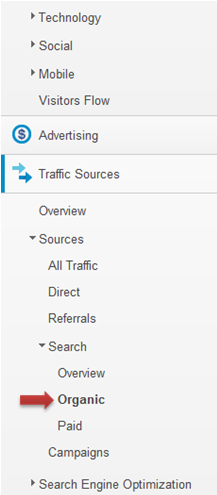
  • From right hand side menu->click on Traffic Sources->Search->ORGANIC as shown in below pic
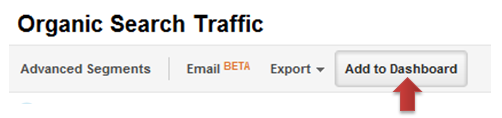
  • Click on “Add to Dashboard” from top menu
  • Select “New Dashboard” from the drop down. Give any name for the dashboard. Select the TABLE checkbox as shown in below pic.
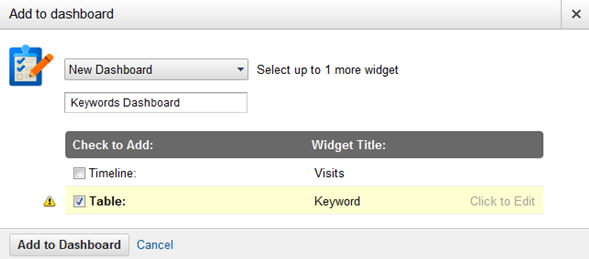
  • Click on “click to edit” and give name to the widget like “Top 10 Branded Keywords”


  • Now select the required metrics like visits, % new visits, Bounce Rate etc…
  • Click on “Add a Filter” and select “Only Show” -> Keywords-> Containing-> Brand Name and save.

  • Now repeat the steps 2 to 6 for non-branded keywords.
  • Select “Don’t Show”->Keyword->Regular Expression->(brand|brand1|brand2) as shown below

Regular Expression-> (brand|brand1|brand2)

You can select brand name, product names, their misspellings etc. and exclude it through regular expression from Non-Branded keywords list.


I’d be interested to hear people’s thoughts on this. Feel free to comment!



TAGGED:dashboard
Share This Article
Facebook Pinterest LinkedIn
Share

Follow us on Facebook

Latest News

cybersecurity efforts
How Behavioral Analytics and AI Are Redefining Cybersecurity for Boca Raton Businesses
Analytics Artificial Intelligence Exclusive Security
data driven risk management in heatlhcare
How Data Analytics Is Changing Healthcare Risk Management
Analytics Exclusive
big data for non-QR lending in real estate
How Real Estate Investors Can Use Big Data for Non-QM Lending
Big Data Exclusive
ai video ad generation
How to Build High-Performing Ad Creatives with an AI Short Ad Video Maker?
Artificial Intelligence

Stay Connected

1.2KFollowersLike
33.7KFollowersFollow
222FollowersPin

You Might also Like

Tips for Starting Your Dashboard Layout

7 Min Read

Defining Data Governance Dashboards

5 Min Read

Is Your Dashboard Working?

3 Min Read

Analytics In A Global Recession: Fixed Price Operational Dashboard

2 Min Read

SmartData Collective is one of the largest & trusted community covering technical content about Big Data, BI, Cloud, Analytics, Artificial Intelligence, IoT & more.

AI chatbots
AI Chatbots Can Help Retailers Convert Live Broadcast Viewers into Sales!
Chatbots
AI and chatbots
Chatbots and SEO: How Can Chatbots Improve Your SEO Ranking?
Artificial Intelligence Chatbots Exclusive

Quick Link

  • About
  • Contact
  • Privacy
Follow US
© 2008-26 SmartData Collective. All Rights Reserved.
Welcome Back!

Sign in to your account

Username or Email Address
Password

Lost your password?