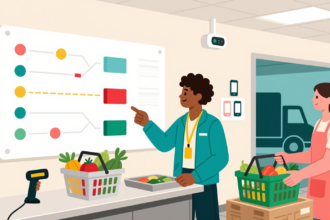



An invoice lands in accounts payable with the wrong purchase order number. A clerk emails the supplier, waits a day or two for a reply, fixes the record, and sends it back for approval. On its own, that looks like a minor snag. Run the same loop a few hundred times a month across several departments for a full fiscal year, and lost hours start showing up on the headcount sheet while quietly degrading downstream financial data.
- Accounts payable data capture is the obvious first candidate
- Automated data reconciliation for faster financial close
- Keeping structured procurement data and requests moving
- AI retrieval and data reconciliation in HR administration
- Choosing the first data workflow to automate
- When an AI automation pilot meets enterprise data systems
- Start with the data work people keep repeating
- Frequently asked questions
Intelligent automation combines AI extraction for messy documents with deterministic data-pipeline rules and human exception review. It pays off first in repeatable back-office work such as accounts payable invoice capture, month-end close reconciliation, procurement routing, and routine HR queries. Compare baseline processing time and exception rework before expanding scope.
- High-volume accounts payable teams cut per-bill friction faster when AI handles layout drift and rules verify PO totals.
- Parallel month-end close runs uncover false matches caused by timing gaps before anyone delegates final sign-off.
- Cross-system data syncs require idempotent write retries and a named owner for every flagged exception queue.
- Cutting redundant approval layers often recovers more staff hours than wiring software around broken sign-off chains.
High-volume data work like this is where intelligent automation services pay off first. Invoice handling, account reconciliation, purchase approvals, and routine HR queries rarely headline an analytics conference, yet they consume skilled staff time and introduce avoidable record errors. Picking one tightly bounded workflow beats trying to automate an entire company at once, provided you measure the baseline accurately.
Accounts payable data capture is the obvious first candidate
Ask almost any finance team where the week disappears, and invoice handling tops the list. Every incoming bill needs header extraction, two-way or three-way matching against purchase orders and receiving logs, duplicate detection, and routing to an approver. One missing line item or mismatched tax total kicks the record back to the start of the queue.
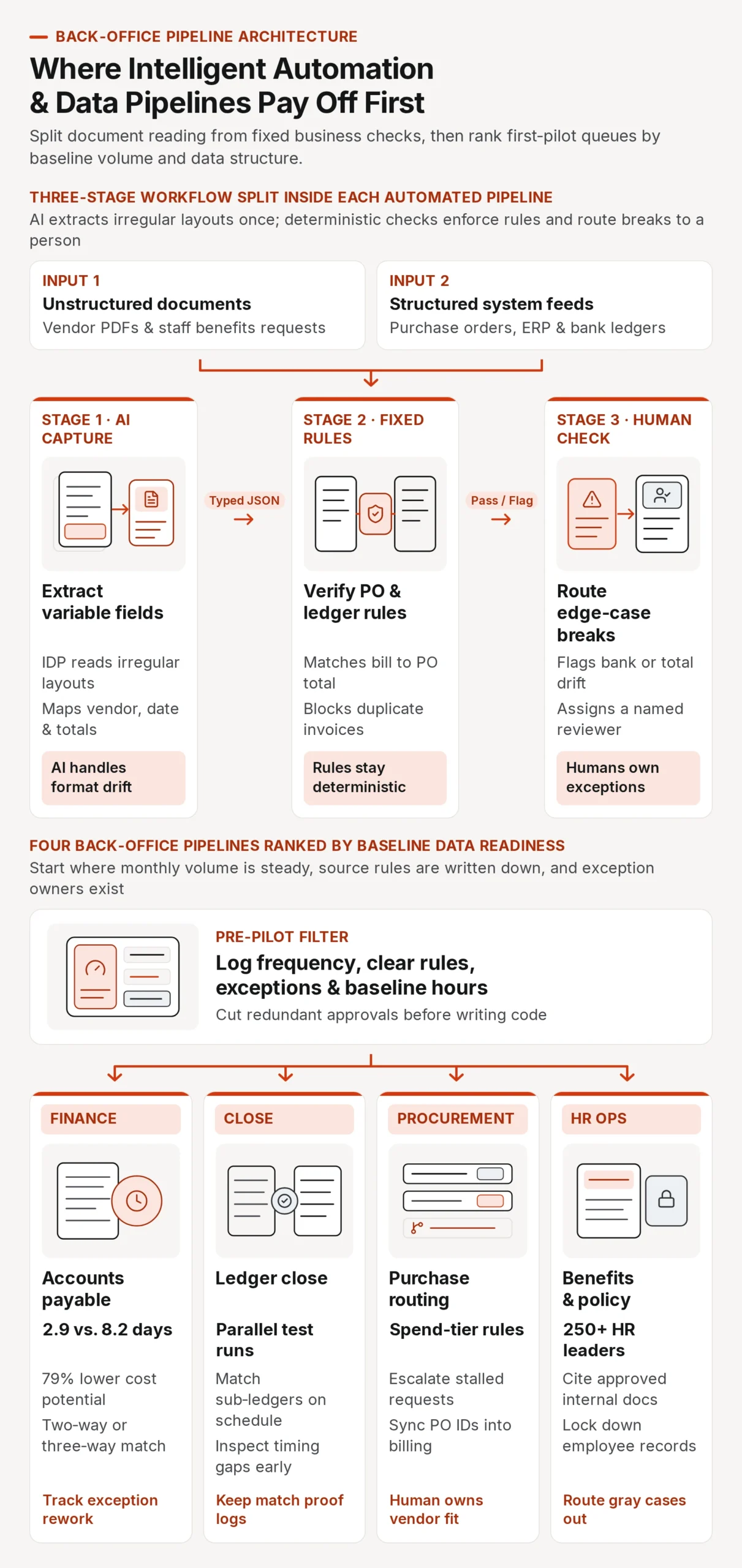
Unlike brittle screen-scraping scripts that break whenever a supplier redesigns a PDF template, intelligent document processing separates format reading from accounting logic. Multimodal extraction reads variable vendor layouts into typed JSON fields, deterministic pipeline checks compare those fields against purchase order totals and master vendor bank tables, and unresolved mismatches route directly to a named reviewer.
Industry benchmarks quantify what that split captures at scale. Ardent Partners’ State of ePayables 2025 report found that best-in-class AP teams lowered invoice processing costs by 79% compared with peer organizations, while firms using advanced automation cut approval cycle time to 2.9 days against an 8.2-day industry average. Treat those numbers as an upper benchmark instead of a guaranteed forecast, because messy supplier data and exception handling decide how much time your team keeps.
Raw invoice volume alone hides how much rework sits behind a ticket queue. Finance teams get a clearer signal by tracking straight-through processing share, exception rate, duplicate payment blocks, and net staff hours spent resolving supplier disputes.
Automated data reconciliation for faster financial close
Month-end close turns into a scavenger hunt when numbers live across disconnected spreadsheets and billing tools. Usually the journal entry rules themselves stay simple. Chasing source extracts, verifying bank settlements, and tracking down missing backups from branch offices burn the calendar days.
Data pipelines eliminate manual assembly by pulling sub-ledger exports on a schedule, applying deterministic match keys across invoices, payments, and bank lines, and surfacing open breaks every morning inside the period. Instead of automating blind sign-off on day one, teams should run proposed matching rules alongside a manual close to inspect false matches from identical dollar amounts or cutoff timing gaps and preserve the underlying proof records for every automated match.
More Read
This is where the multi-modal understanding of intelligent automation changes the architecture.
Hari Om Garg, CIOWatch four close metrics over at least two reporting cycles: total days to close the books, count of unreconciled items open past close day three, false-match overrides caught in audit sampling, and staff hours spent collecting backup documentation.
Keeping structured procurement data and requests moving
Purchase requests frequently stall when three managers sit in an email approval chain. One unread message leaves the requester guessing where the order stands, even though nobody is making a hard commercial decision. The bottleneck sits purely in inbox handoffs.
Structured workflow routing advances requests automatically by spend tier, verifies supplier master IDs against active contract tables, blocks incomplete cost-center codes before submission, and escalates overdue approvals cleanly. Linking approved purchase order fields directly to accounts payable prevents clerks from rekeying line items across procurement and ERP screens, while human buyers retain final calls on vendor fit, unusual terms, and off-catalog spend.
Compare average requisition approval time, cost per purchase order, PO-to-invoice variance rate, and manual reminder volume before scaling routing automation across new cost centers.
AI retrieval and data reconciliation in HR administration
Human resources teams answer the same operational questions week after week on leave balances, benefits tiers, payroll cutoffs, onboarding checklists, and travel rules. Each reply takes a few minutes, yet across a growing workforce those tickets interrupt higher-priority employee support.
Lively’s 2026 HR AI Report, based on a November 2025 survey of more than 250 HR leaders at US companies with 1,000 or more employees, identified benefits administration as a primary bottleneck alongside manual coordination and data reconciliation across fragmented HR systems. Repeat questions around plan rules and status updates give teams a measurable baseline for deflection quality.
Deterministic workflow rules belong under onboarding packets, ticket routing, and employee status synchronization between payroll and identity tools. A retrieval-grounded assistant can answer routine policy queries strictly from approved internal handbooks while escalating sensitive leave, compensation, or disciplinary matters straight to an HR specialist. Enforce role-based access controls so personal compensation and medical records never enter unauthenticated search indexes or stale document caches.
Track repeat policy ticket volume, median resolution time, onboarding task completion before day one, and audit logs covering every HR record read or synced by service accounts.
Choosing the first data workflow to automate
The workflow that frustrates staff most visibly is not always the best first candidate. Some AI workflow automation targets rely heavily on undocumented context, whereas quiet data entry queues burn hundreds of hours each month under stable rules. Four checks narrow the field quickly:
- Monthly execution frequency helps target tasks whose combined handling hours justify integration work.
- Documented decision logic ensures downstream verification can test outputs deterministically.
- Measured exception rate exposes missing supplier IDs, malformed PDFs, and edge cases that erode projected savings.
- Pre-pilot baseline telemetry locks in real cycle time, rework hours, and error rates before rules change.
| Workflow Candidate | AI Capture or Retrieval Step | Deterministic Pipeline Check | Human Exception Trigger | Primary Baseline KPI |
|---|---|---|---|---|
| Accounts payable capture | Extract vendor, date, tax, and line fields from varied PDFs | Two-way and three-way PO match plus duplicate invoice check | Bank-detail change or variance beyond tolerance | Straight-through rate & cost per invoice |
| Close reconciliation | Link supporting receipts and surface mismatch explanations | Exact key join across sub-ledger, ERP, and bank feeds | Duplicate dollar amounts or cutoff timing gaps | Open breaks past day 3 & close duration |
| Procurement routing | Classify free-text requests and read supplier quote terms | Validate cost-center budget, spend tier, and vendor ID | Unusual contract clauses or off-catalog supplier | Approval cycle time & PO mismatch rate |
| HR policy & benefits | Answer standard handbook questions from approved sources | Enforce RBAC and sync approved fields across HRIS | Sensitive leave, medical, or pay dispute cases | Repeat ticket volume & resolution time |
Audit the manual process itself before encoding it into software. Automating reconciliation across redundant approval hops preserves delays inside faster pipes. Simplifying ownership and deleting unnecessary sign-offs before building connectors often produces half the cycle-time drop on its own.
When an AI automation pilot meets enterprise data systems
Workflows that run cleanly inside one finance team often stall once rolled out across regional sites. Separate ERP tenants, drifted vendor master keys, and undocumented local spreadsheets break naive connector assumptions within the first week.
Exceptions need a clear owner too: one designated reviewer or queue must handle flagged entries, repair bad master records, and approve edge cases outside standard rules. Before expanding any single-site pilot, verify four production controls across systems:
- Cross-site identifier mapping reconciles vendor IDs, tax codes, and chart-of-accounts mappings across every branch instance.
- Idempotent timeout recovery simulates a downstream API timeout after writing a voucher so retries cannot post duplicate records.
- Exception queue SLA alerts surface aging mismatches automatically so stalled bills never disappear silently between shifts.
- Scoped permission audit logs bind every read and write token to a specific service role for SOX and privacy traceability.
# Pilot Readiness & Baseline Telemetry Config (AP Invoice Pipeline)
workflow: ap_invoice_three_way_match
baseline_window_days: 30
metrics_to_log:
  - avg_cycle_time_hours
  - straight_through_rate_pct
  - exception_rework_minutes
  - duplicate_block_count
guardrails:
  extraction_min_confidence: 0.92
  po_total_tolerance_usd: 5.00
  idempotency_key: "vendor_id:invoice_number:fiscal_year"
  require_human_review_on:
    - bank_account_change
    - po_number_mismatch
    - confidence_below_threshold
  exception_owner_role: "ap_exceptions_lead"
Start with the data work people keep repeating
Back-office automation rarely starts with an enterprise platform overhaul. Value shows up first with one supplier invoice nobody keys in by hand, one close reconciliation surfacing its own breaks ahead of month-end, or one procurement request routing smoothly without three follow-up emails.
Pick one high-volume workflow, log thirty days of clean baseline numbers, and verify net time saved after accounting for exception review. Expand to additional departments only once cross-site identifiers, retry safety, and human escalation queues hold steady in daily operations. Staff should spend less time copying records across tools and more time acting on reliable numbers.
Frequently asked questions
What does intelligent automation mean in data workflows?
Intelligent automation pairs machine learning capture for unstructured files such as PDF invoices and email requests with deterministic business rules and audit-logged system connectors. Instead of relying solely on fixed screen coordinates like legacy macros, the pipeline reads varied document layouts, enforces structured database checks, and sends uncertain records to human reviewers.
Why start intelligent automation in accounts payable first?
Accounts payable combines high monthly document frequency with strict accounting rules around purchase orders, tax lines, and vendor bank records. Because baseline approval times, exception volume, and processing cost per bill are already tracked by most finance teams, an AP pilot produces clear before-and-after proof faster than softer knowledge tasks.
How do teams verify automated reconciliation accuracy before sign-off?
Finance teams typically run candidate reconciliation rules in shadow mode alongside an active manual close for one or two cycles. Reviewing false matches from identical dollar values alongside missed matches reveals edge-case timing gaps while retaining full source-record proof for external auditors.
What causes back-office automation pilots to stall after rollout?
Multi-site expansion commonly exposes mismatched supplier IDs across regional ERPs, missing retry keys that duplicate records after network timeouts, and unassigned exception queues. Eliminating redundant manual approvals and locking down exception ownership before scaling keeps daily error rates from wiping out staff time savings.