

The mitochondria is the powerhouse of the cell. It’s responsible for creating the energy your cells power your body with. Or something. Biology was a long time ago.
Mito is the powerhouse of your data analytics workflow. We built Mito to be the first analytics tool that’s easy to use, super powerful, and designed to keep your workflow yours forever.
Easy Smeasy
When it comes to data analytics, not much is easier to use than a spreadsheet. For this reason, spreadsheets have been the predominant tool when it comes to basic data analysis for the past 20 years. If you work with data, you’ve done work in Excel or Google Sheets.
Spreadsheets are easy to use along two dimensions. First, they make it really easy to see and understand what data you’re actually working with – making it easier for you to diagnosis how to proceed with your analysis. Then, once you’re ready to start your analysis, spreadsheets make it easy to point and click your way to a completed, informative analysis — no ‘coding’ required.
More Read

But spreadsheets aren’t built for large datasets, or complex analytics, or repeatable processes.
Great Power
If you’re looking to analyze large data sets quickly, or to do a complex analysis, or to create a repeatable data analytics process, you’re probably looking to use python. Python is the go to language for modern data analytics. It’s able to support significantly larger datasets than traditional spreadsheets, allows you to do machine learning and AI analytics, and provides infinite opportunities for customization. They also have led to a number of opportunities with predictive analytics.
However, Python is much harder to use and less intuitive than spreadsheets. For one, it’s a lot harder to gain a visual understanding of your data when it’s not all right in front of you. The default visualization of a pandas dataframe, the primary data type for Python data analysis, is not at all interactive and only minimally informative, as it only displays a handful of rows and columns of your dataset. Moreover, actually learning how to manipulate your data in Python in a useful manner can take days or weeks as you learn the necessary syntax and background knowledge to actually complete your analysis. Nobody has ever argued that the pandas syntax is intuitive.
Data analytics tools like Alteryx and Power BI were built to address these usability problems, while also giving users similar power to Python.
Ownership and flexibility
Alteryx and Power BI are point and click data and analysis tools that have the ability to analyze much larger datasets than traditional spreadsheets, but they limit data workers in two ways. First, unlike programming languages, these tools actually lock you into a specific environment. If you do your analysis in Alteryx, you _always_ have to do your analysis in Alteryx. Not only does this lock you into a specific workflow, but it constraints your analysis unnecessarily. If Alteryx doesn’t support the specific analysis tool you require, you’re SOL. This lack of flexibility either forces you to fracture your workflow across multiple tools or alter the question/answer pair you’re pursuing. (It’s also worth noting that tools like Alteryx cost upwards of $5000 a month per user.
Easy, Powerful, and Flexible
Mito was specifically designed with all three of our EDA desires in mind! Our philosophy is that data analysis should be as easy as Excel and Alteryx, but with the power and ownership structure of Python and Pandas. This leads to a tool where you can easily see and interact with your data through a point and click environment, but one where you can also use code to extend your analysis if Mito doesn’t support a specific part of your EDA process.
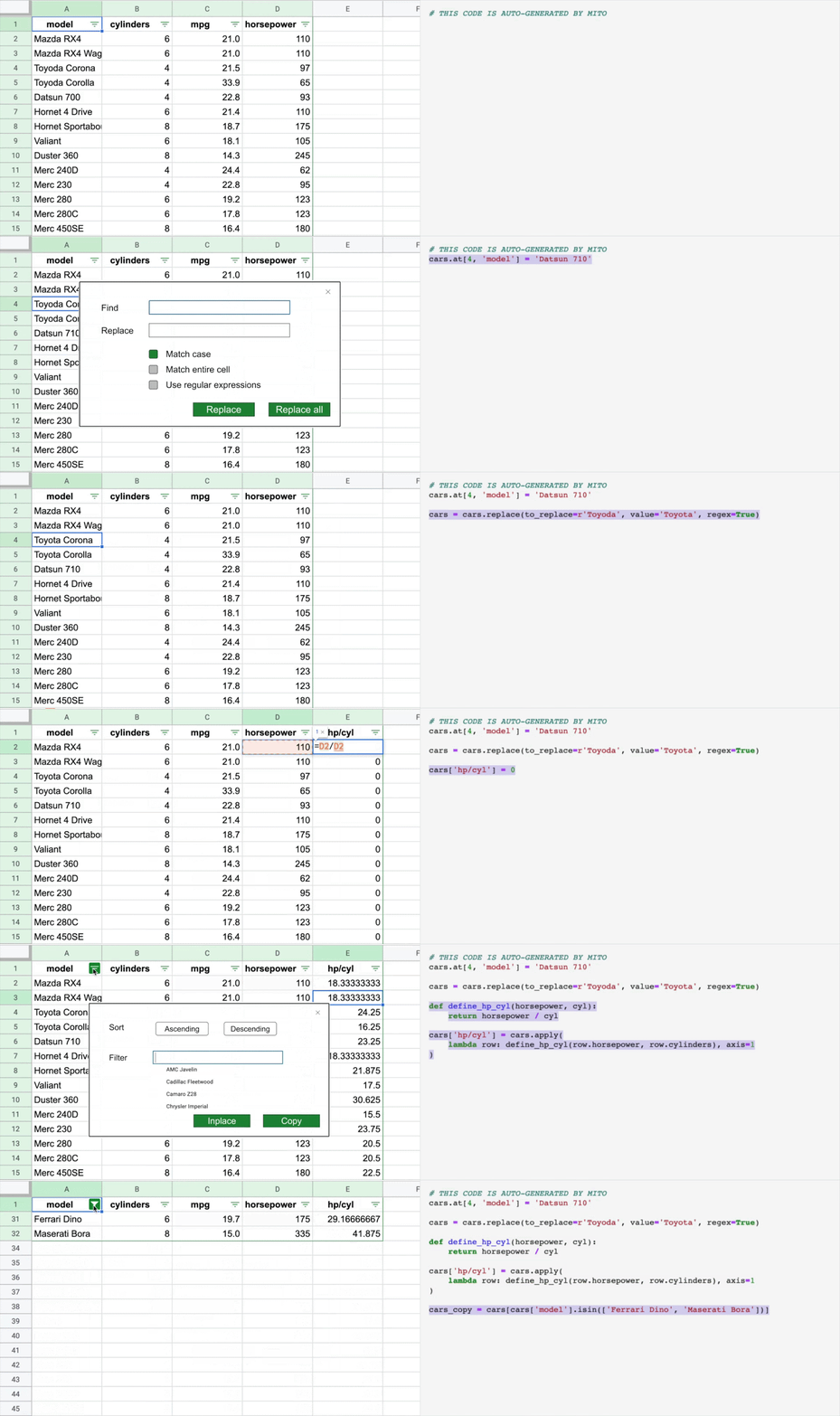
So, what is Mito? Mito is a spreadsheet extension to JupyterLab that automatically converts your analysis into standard Pandas code. Because Mito is at its core a spreadsheet, your data is default visible and interactive. Just like you’d expect from Excel, you can edit, scroll, and transform your data using the most popular spreadsheet formulas. And because Mito generates Pandas code, it can easily support analyses with millions of rows of data — in fact, we regularly use a 10 million row dataset in our live demos of the tool.
But unlike Alteryx, because Mito generates Python/Pandas code, your analysis is completely yours, just as if you wrote the code by hand! In fact, early Mito users are passing Mito altered dataframes into matplotlib and Scikit-Learn, or even taking their Mito-generated code and putting it on servers to process data as it comes in. You’re completely free to alter and take your analysis with you as you see fit.